OIDAR GST Registration in India: How to Register and File GSTR-5A
Register for OIDAR GST in India and file GSTR-5A. The portal walkthrough, the Indian signatory rule, and the deadlines that block later months
Listen to article
Audio version (0% complete)

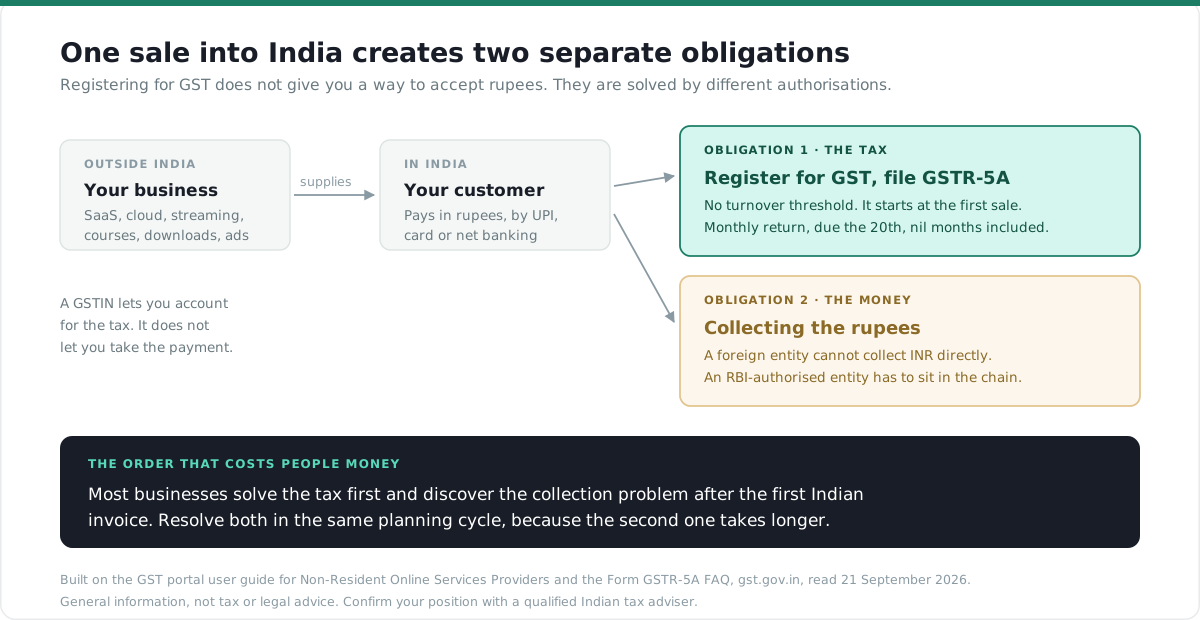
If your business is outside India and you sell digital services to Indian consumers, India expects you to register for GST and file a monthly return. There is no turnover threshold to cross first. The obligation starts at the first sale.
This is the registration walkthrough and the filing cycle, taken from the GST portal's own documentation, including the two requirements that stop most applications before they start.
The short answer
OIDAR stands for Online Information and Database Access or Retrieval services. In GST terms it covers digital services supplied from outside India to someone in India.
You register on the GST portal under Services, Registration, New Registration, selecting "Non-Resident Online Services Provider and/or Non Resident Online Money Gaming Supplier" from the "I am a" dropdown.
You file Form GSTR-5A monthly, by the 20th of the month after the tax period. It is mandatory even when you had no sales at all.
Your PAN is optional. An Indian authorised signatory is not. That is the requirement that catches most foreign applicants, and it is covered below.
What OIDAR stands for, and who it catches
The GST portal defines Form GSTR-5A as the return furnished by an OIDAR services provider "of the services provided to non-taxable persons, from a place outside India to a person in India."
In practice that reaches software sold as a subscription, cloud and hosting, streaming, online courses, digital downloads, advertising space, data services and similar. Since the GST portal's registration form now offers a Type of Supply choice of online money gaming, OIDAR services, or both, online money gaming sits alongside it as a separate category with its own reporting.
Two distinctions decide how a sale is reported rather than whether you register.
Selling to a consumer who is not registered for GST means you charge and remit the tax. This is the main case and it is what Table 5 of the return captures.
Selling to a GST-registered business in India is different. The portal's own guidance describes those supplies as ones "on which tax is to be paid by the said registered persons on reverse charge basis". You still report them, in Table 5B, but the tax is accounted for by your customer.
Getting that split right at invoice time is what makes the monthly return straightforward rather than a reconstruction exercise.
Two things you need before you start
These are the requirements that stop applications, and neither is obvious from the outside.
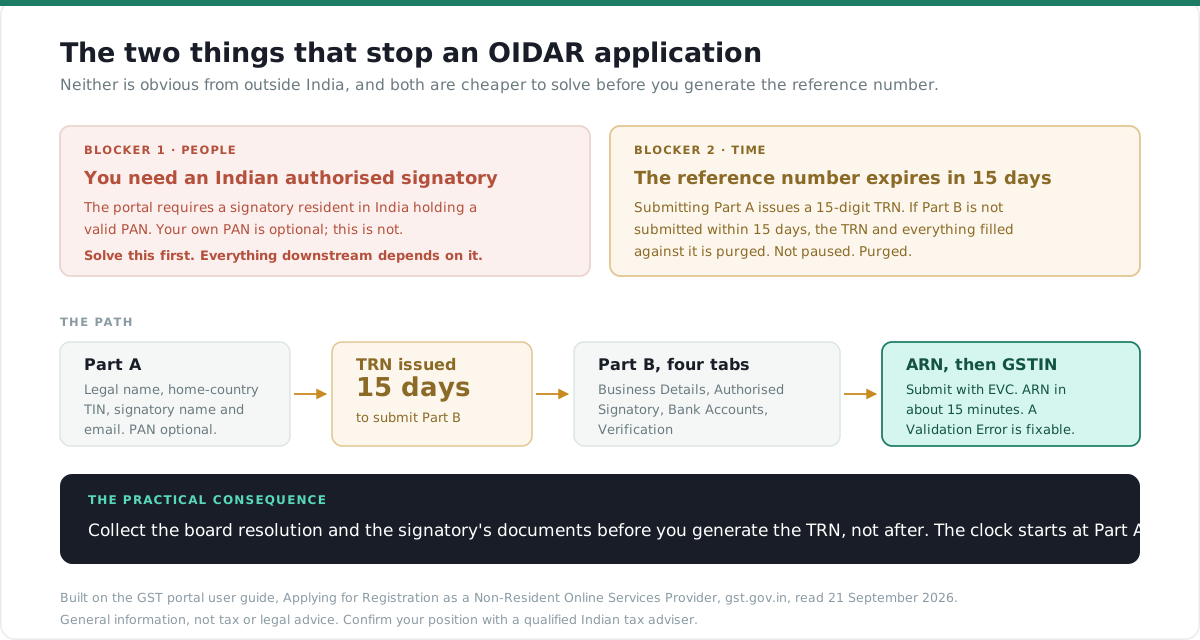
An authorised signatory who is resident in India, with a valid PAN. The GST portal states it plainly: "Authorized Signatory must be a resident of India with a valid PAN Card." Your own PAN as the applicant is explicitly "not a mandatory field", and neither is the signatory's PAN at Part A stage, but the residency requirement for the signatory itself is not optional. If you have no Indian presence, this is the thing to solve first, because everything downstream depends on it.
You may also appoint a separate representative in India, which is a distinct field from the authorised signatory. Note that although bank account details are otherwise optional, the portal notes they are "required to be added, in case of nomination of an Indian Authorised representative."
Your Tax Identification Number from your home country. Part A asks for the "Tax identification number (TIN) / Unique Number" of the country of origin. This substitutes for the PAN you do not have.
Registering: Part A and Part B
The application is split in two, and the gap between them has a deadline.
Part A collects your legal name, PAN if you have one, your home-country TIN, the name and email of your Indian authorised signatory, and optionally an Indian representative. A mobile number for the signatory is optional here, but if you leave it out you will not receive the SMS confirmations later.
Submitting Part A generates a 15-digit Temporary Reference Number, sent to your email.
Part B is where the real application lives. You log back in using the TRN.
This is the deadline nobody warns you about. The portal states that if the application is not submitted within 15 days, "the TRN and the entire information filled against the TRN is purged after 15 days." Not paused. Purged. If you are waiting on a board resolution or a signatory's documents, start collecting those before you generate the TRN, not after.
The four tabs
Part B has four tabs, and the application is only submittable once each is complete.
Business Details. Country of incorporation, the date you commenced online service in India, and the URLs of the websites through which you supply taxable services. You add URLs one at a time. You also select a Range Code, upload proof of being a non-resident online service provider, and choose your Type of Supply.
Authorised Signatory. Personal details of your Indian signatory, plus a document proving their authority. The portal accepts either a Letter of Authorisation or a copy of a resolution passed by the board of directors or managing committee. Watch the file limits: photographs must be JPEG under 100 KB, and the proof document PDF or JPEG under 100 KB.
Bank Accounts. Optional since 27 December 2018, and you can add them later through an amendment application. The exception is the Indian representative case noted above.
Verification. Tick the declaration, choose your authorised signatory, enter the place, and submit with EVC. An OTP goes to the signatory's registered email.
After submission the status moves from Pending for Validation to Pending for Processing, and an Application Reference Number arrives within about fifteen minutes. If it shows Validation Error, the application has not failed permanently: you edit and submit again.
GSTR-5A: the monthly return
Once you hold a GSTIN, the filing cycle begins.
Due by the 20th of the month following the tax period, unless the Commissioner extends it.
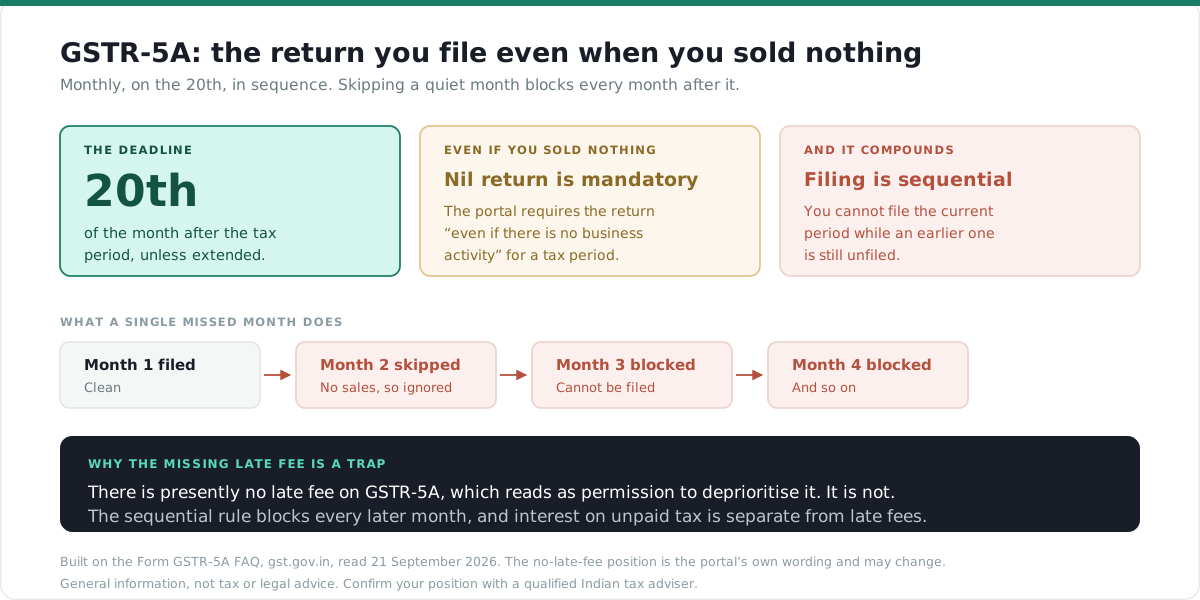
Mandatory every month, including nil months. The portal is unambiguous: the return "needs to be filed even if there is no business activity (i.e. it is a Nil Return) for a tax period." A quiet month is still a filing month.
Sequential. You cannot file the current period if the previous period is unfiled. Miss one and you cannot simply resume; you work forward from the gap.
You file it at Services, Returns, Returns Dashboard, either by entering data directly on the portal or through an Application Software Provider via a GST Suvidha Provider.
Table | What it captures |
5 | Taxable outward supplies made to a non-taxable online recipient in India |
5A | Amendments to those supplies |
5B | Taxable outward supplies to registered persons in India, other than a non-taxable online recipient, on which tax is paid by that registered person on reverse charge |
5C | Amendments to those supplies |
5D | Supplies of online money gaming made to a person in India |
5E | Amendments to online money gaming supplies |
6 | Interest or any other amount |
7 | Auto-populated from tables 5, 5A, 5D, 5E and 6. Not editable |
Table 7 only becomes visible once you click Proceed to File. The term "non-taxable online recipient" is defined in the Integrated Goods and Services Tax Act, 2017, and your classification of each customer against that definition is what drives the split between Table 5 and Table 5B.
The rules that catch people out
Four things about this return behave differently from ordinary GST filing.
There is no input tax credit. The portal states plainly that an OIDAR services provider "cannot claim any ITC in Form GSTR-5A", and that no Electronic Credit Ledger is maintained for OIDAR taxpayers at all. Whatever GST you incur elsewhere does not offset here.
Everything is paid in cash. Interest and other liabilities "can be discharged only through Electronic Cash Ledger". If the balance is short you create a challan at Services, Payments, Create Challan, and top it up before filing.
Part payment does not work. The return cannot be filed after a partial payment of tax. The File button only activates once the cash ledger covers the full liability and the declaration is ticked.
There is currently no late fee, and that is a trap rather than a relief. The portal notes that "at present, there is no late fee in case of delayed filing of Form GSTR-5A." That absence tends to be read as permission to deprioritise the return. It is not. The sequential filing rule means an unfiled month blocks every month after it, and interest on unpaid tax is a separate matter from late fees. A gap compounds quietly.
Once filed, the return cannot be reset. You can edit or delete details right up until you file, and not afterwards.
After registration: collecting the money
Registering for GST and actually getting paid by Indian customers are two separate problems, and solving the first does not touch the second.
A GSTIN lets you account for the tax. It does not give you a way to accept rupees. Indian customers overwhelmingly pay by UPI, cards and net banking, and a foreign entity cannot collect INR directly. An RBI-authorised entity has to sit in the chain.
That is a different authorisation from anything GST registration provides, and it is worth resolving in the same planning cycle rather than discovering it after your first Indian invoice. Our guide to merchant of record in India covers how the roles separate, including who ends up owing the GST in a marketplace arrangement.
If you want to check whether a specific service you supply falls within OIDAR before going further, we have a free OIDAR checker.
Collecting from Indian customers?
A GSTIN lets you account for the tax. Collecting rupees needs an RBI-authorised entity in the chainYour customers pay by UPI, card or net banking, the way India actually paysYou settle offshore in your own currency, within 48 hours, with no Indian entity to set up
See how India collections work
EximPe is an RBI-authorised Payment Aggregator, Cross Border. Certificate No. 291/2026.
Frequently Asked Questions
Frequently Asked Questions
Online Information and Database Access or Retrieval services. It is the GST category for digital services supplied from outside India to a person in India.
No. The obligation is not triggered by crossing a turnover figure. If you supply OIDAR services into India, registration applies from the first supply.
Not for yourself. The portal marks the applicant's PAN as not mandatory and accepts your home-country Tax Identification Number instead. Your authorised signatory, however, must be resident in India with a valid PAN.
It is the monthly return for OIDAR service providers, due by the 20th of the month following the tax period, or a later date if the Commissioner extends it.
Yes. A nil return is still mandatory, and skipping it blocks the following month's filing.
No. There is no input tax credit in Form GSTR-5A and no Electronic Credit Ledger is maintained for OIDAR taxpayers.
There is presently no late fee on GSTR-5A. That does not make late filing safe, because you cannot file a later period until the earlier one is filed, and interest on unpaid tax is separate from late fees.
No. They are separate problems. GST registration handles the tax. Collecting rupees from Indian customers requires an RBI-authorised entity in the chain.