How to Check Shipping Bill Status on ICEGATE: Step-by-Step Guide (2026)
Check SB status on ICEGATE free, no login: the Public Enquiries 2.0 path, what LEO and EGM mean for your refund, and fixes for No Record Found.
Listen to article
Audio version (0% complete)
You can check Shipping Bill status on ICEGATE without logging in. Open Public Enquiries 2.0, click Document Status, choose Shipping Bill, then enter your port code, Shipping Bill number and Shipping Bill date. You only need a login to download the digitally signed Shipping Bill PDF.
The status tells you more than whether customs is done. The LEO date is your official date of export, and the EGM is what starts IGST refund, drawback and RoDTEP processing. This guide covers the exact clicks, what every status means and what it blocks, and what to do when the portal says No Record Found.
TL;DR: the fastest way to check
- Go to icegate.gov.in → Services → Enquiry → Public Enquiries 2.0
- Select Document Status, then Shipping Bill
- Choose your location (port code), enter the Shipping Bill number and date, complete the CAPTCHA, submit
- No login needed for status. Log in only to download the signed PDF copy.
What Is Shipping Bill?
A shipping bill is an official customs document filed by exporters, containing details about the goods being exported, their value, destination and payment terms. It is mandatory for legal clearance and for claiming any export incentives or duty drawbacks. For formats and types, see our guide on what a shipping bill is. The same portal handles pre-export checks too: you can check your AD code status on ICEGATE before you ever file your first Shipping Bill.
What Is Shipping Bill Status?
Shipping Bill Status is a real-time indicator that shows exactly where your export shipment currently stands in the Indian customs clearance process. After your CHA files a Shipping Bill in official ICEGATE website (Indian Customs Electronic Gateway), your shipment enters the customs system. As customs processes your paperwork and your goods move through the port, the status updates automatically to reflect current progress. For example: Under Assessment, Examination, Query Raised, LEO Granted.
Major changes in 2026: Public Enquiries 2.0
ICEGATE rolled out Public Enquiry 2.0 in February 2026. The legacy enquiry links and standalone status pages have been retired, and every document enquiry now sits under a single dashboard.
Two practical changes: the menu path is different (there's now an Enquiry step before Document Status), and every enquiry requires you to select your customs location (port code) from a dropdown before it will return anything. Get that field wrong and the portal reports no record even when your Shipping Bill exists.
The old Public Enquiries 1.0 path no longer works. If you have it bookmarked, replace the bookmark with the Public Enquiries 2.0 link above.
How to check Shipping Bill status without logging in (guest access)
This is what most exporters actually need, and it takes about thirty seconds.
Step 1 — Open the portal. Go to icegate.gov.in and hover over Services in the top menu, then click Enquiry.
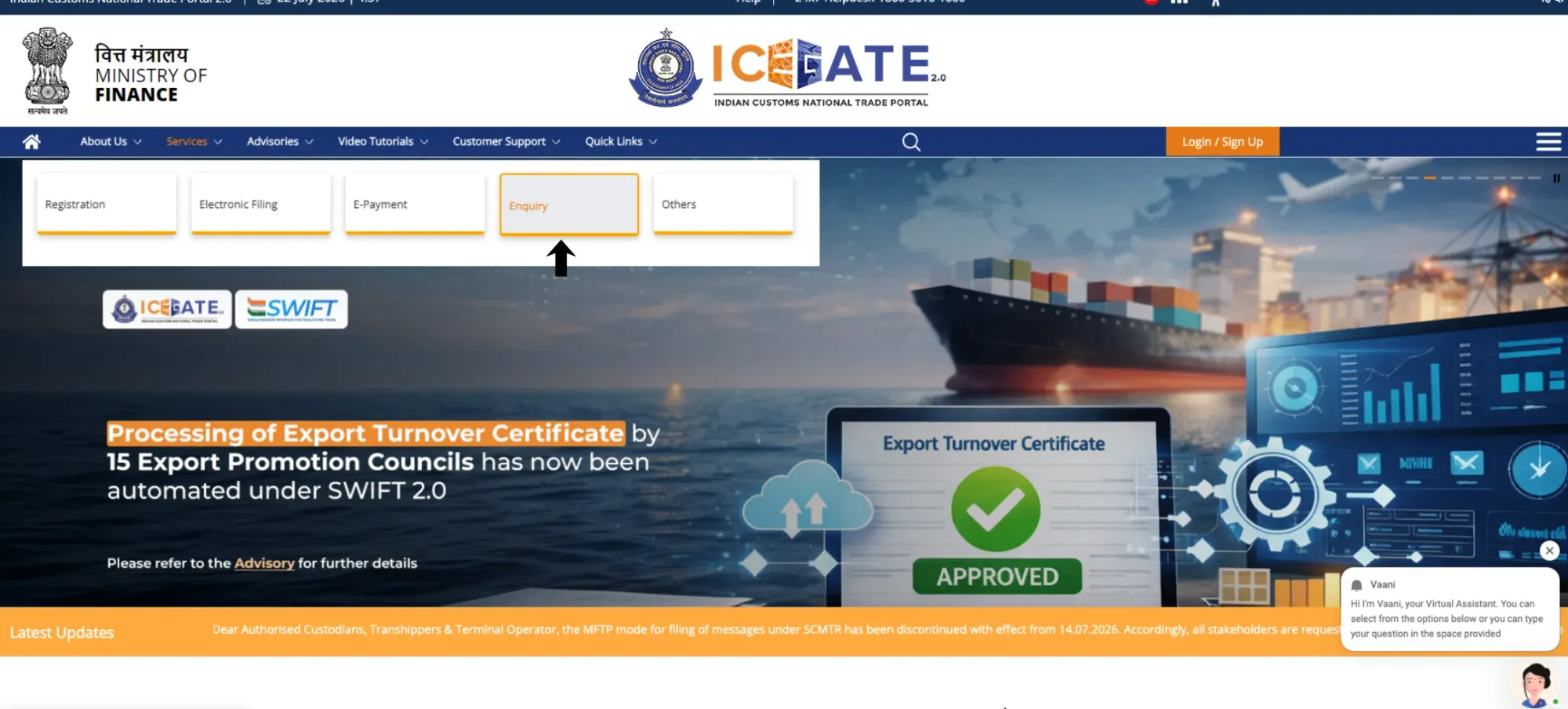
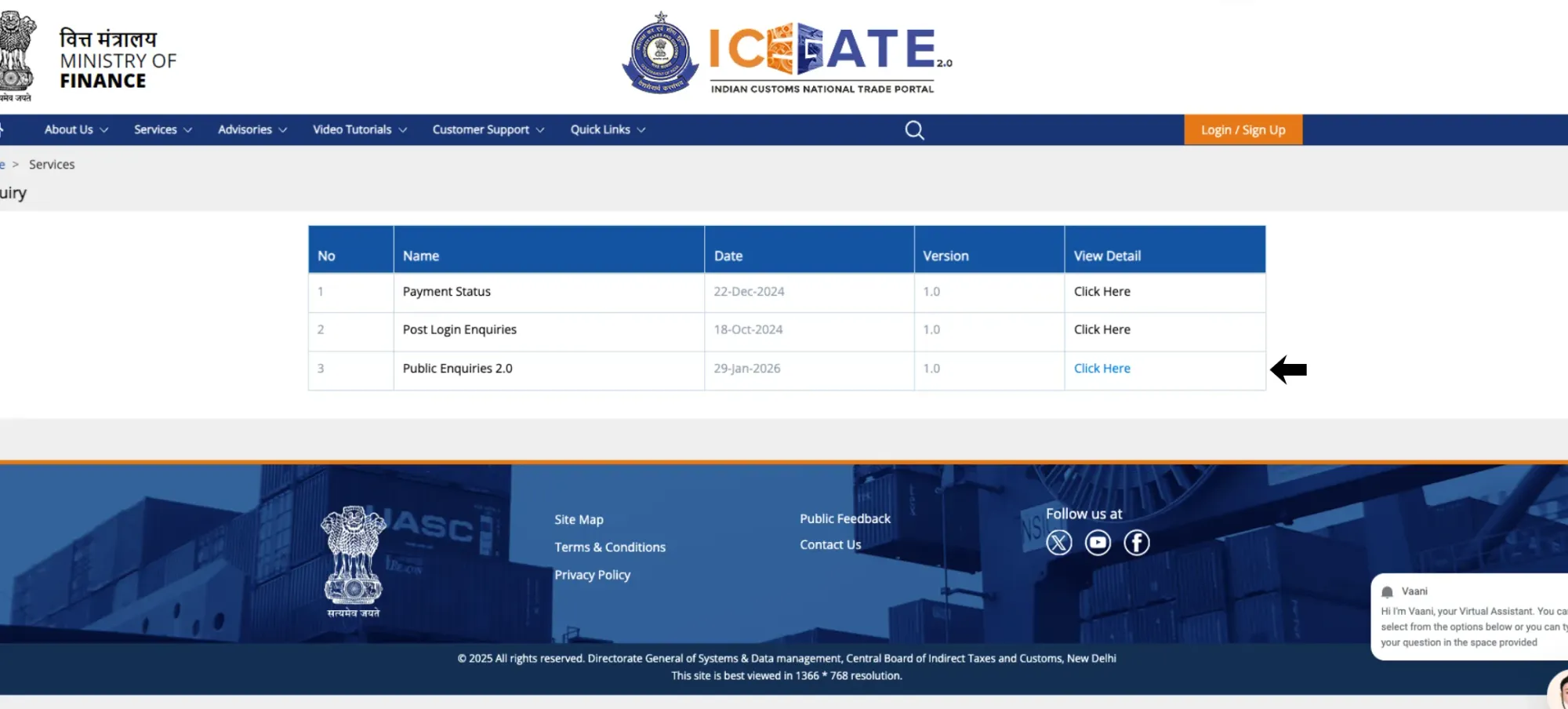
Step 2 — Open Public Enquiries 2.0. Under Enquiry, select Public Enquiries 2.0.
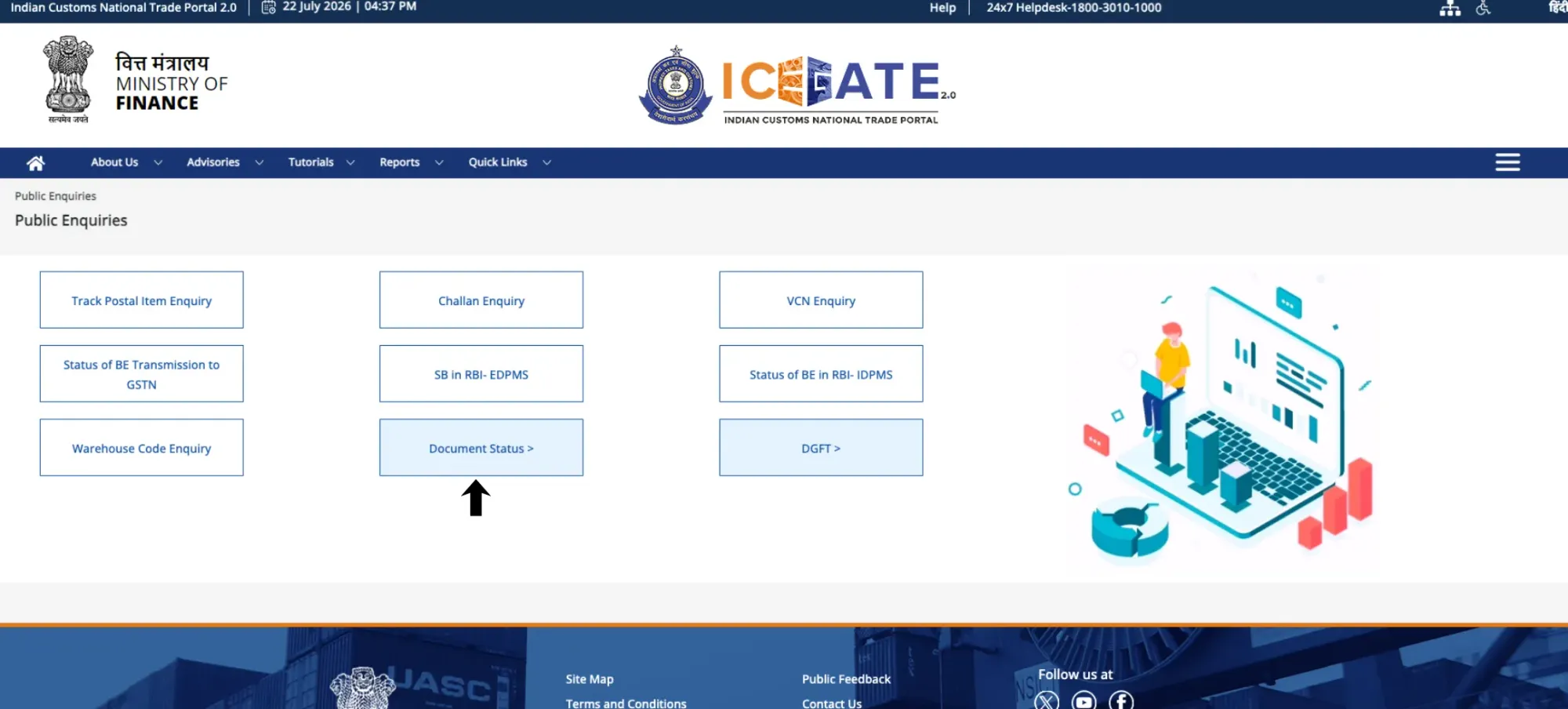
Step 3 — Choose the document type. Click Document Status, and select Shipping Bill from the options.
Step 4 — Select your location. Pick your customs port code from the Select Location dropdown. This is the field people get wrong most often, a Shipping Bill filed at Nhava Sheva won't surface under Mundra.
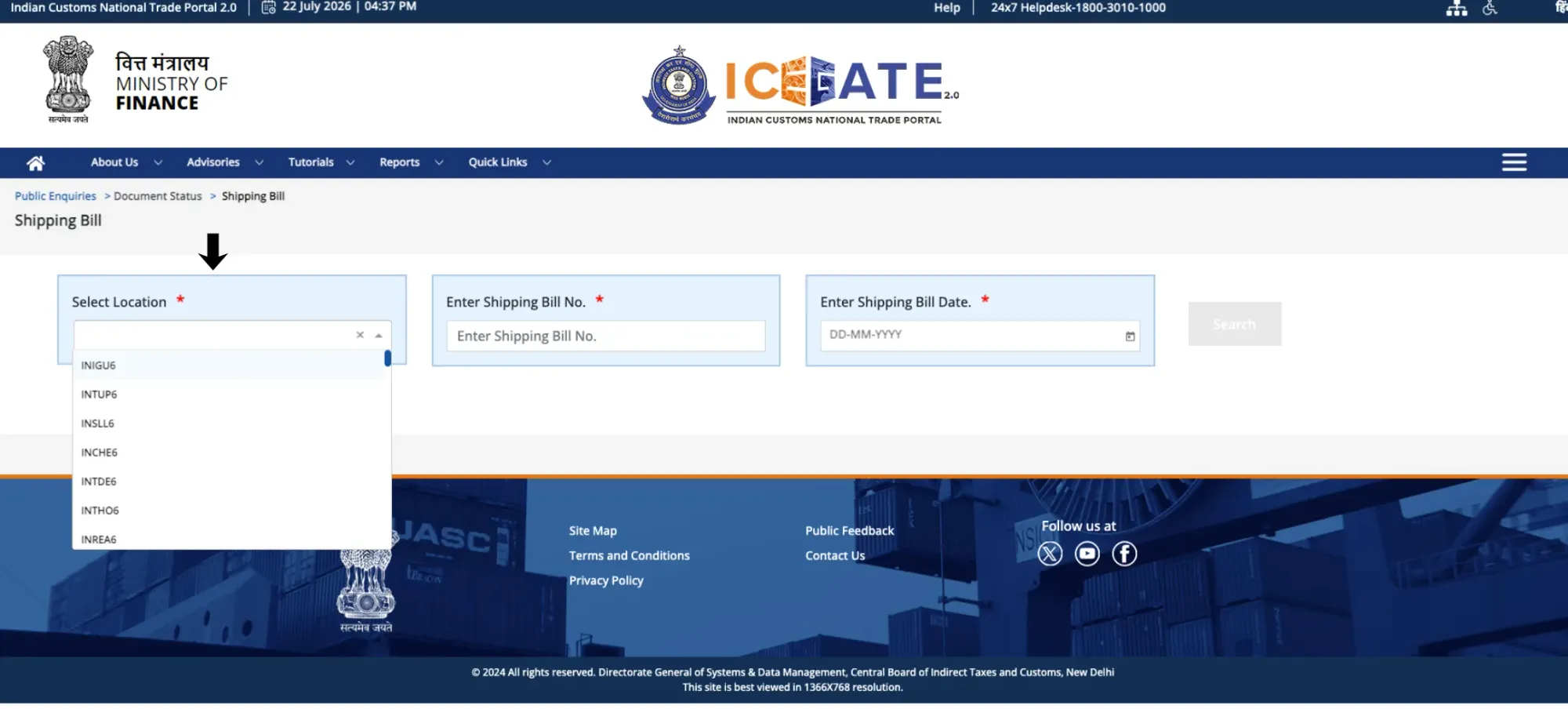
Step 5 — Enter your Shipping Bill details. Type the Shipping Bill number and the Shipping Bill date exactly as filed, and click Search.
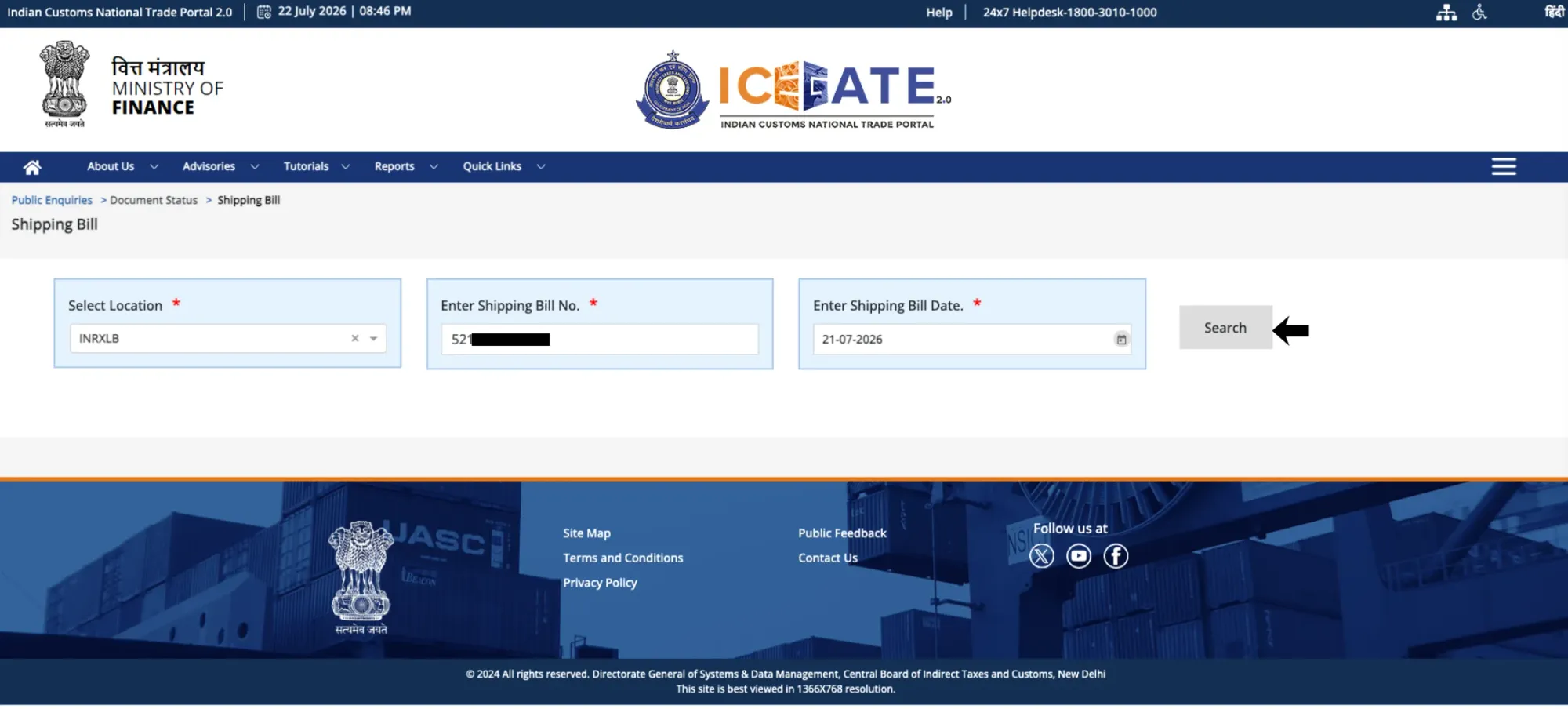
Step 6 — Read the result. You'll get the current status, filing details, and related tabs - LEO details and EGM status where applicable. Click through the tabs; the summary screen doesn't show everything.
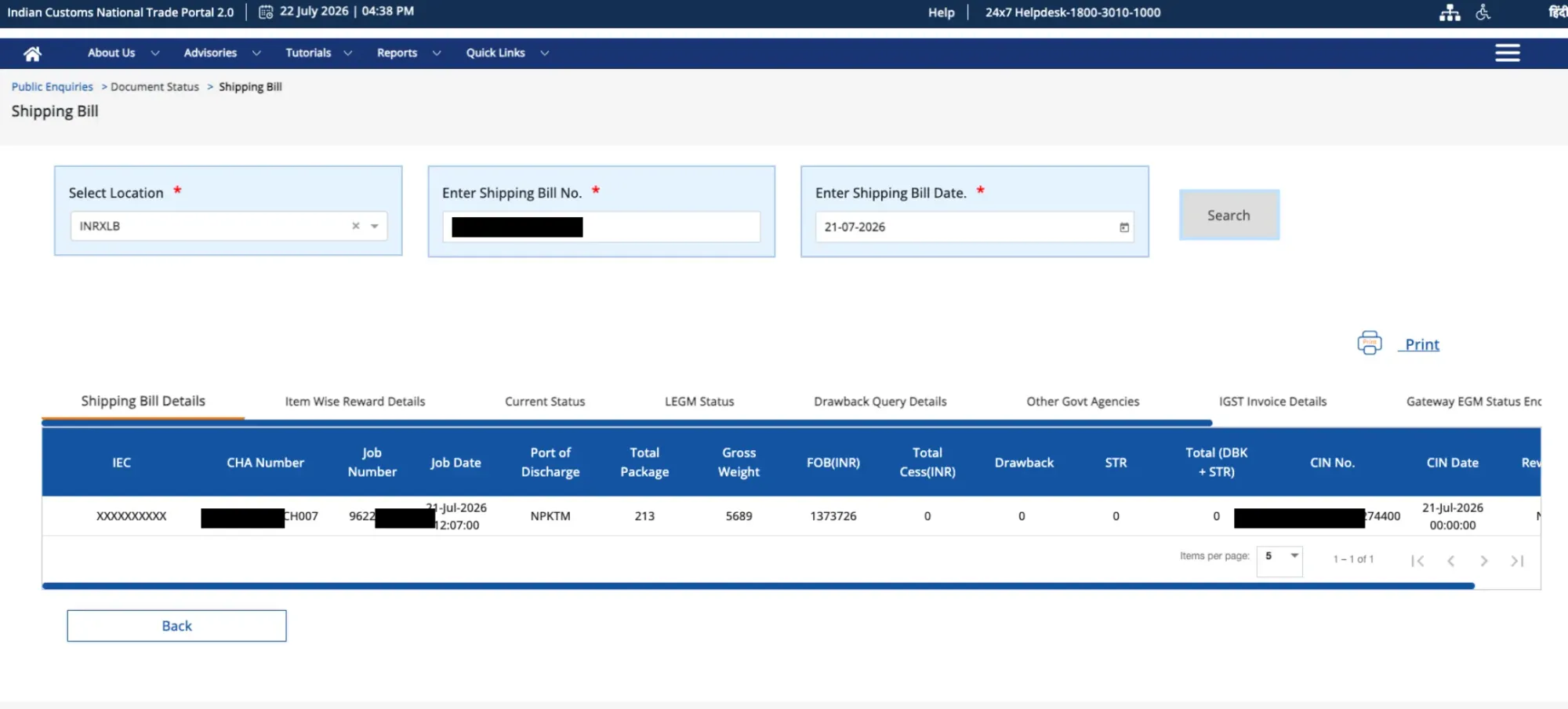
How to check with login (detailed view and document download)
Guest access gives you status. Logging in gives you history and the actual document.
- Go to icegate.gov.in and click Login.
- Enter your registered ICEGATE credentials.
- From the dashboard, open Services → Enquiry → Public Enquiries 2.0 → Document Status → Shipping Bill, or use the Document Download Utility for the signed copy.
- Enter your port code, Shipping Bill number and date.
The logged-in view adds the full processing history with timestamps, query details and customs officer remarks, LEO details, and EGM status. Downloading the final digitally signed Shipping Bill PDF requires login, and it's free, as many times as you need.
If you haven't registered yet, or you're hitting login errors, our complete ICEGATE guide covers registration, the GST-IEC prerequisite, and the DSC troubleshooting that causes most access problems.
Shipping Bill status codes: what each one means and what it blocks
Status labels vary slightly by port depending on the ICES version, but they map to these stages. The column that matters most is the last one: whether your goods can leave yet.
Status | What it means | Your next action | Can goods leave? |
SB Submitted / Under Processing | Filed and received; awaiting initial customs review | Wait; re-check later in the day | ⏳ Not yet |
Under Assessment | Customs is verifying classification, value and documents | Wait; keep your CHA reachable for queries | ⏳ Not yet |
Query Raised / Pending Clarification | Customs found a discrepancy and needs a response | Act now - your CHA must reply; the clock is stopped until you do | ⛔ Blocked |
Examination Pending / Exam Scheduled | Physical inspection of the consignment is scheduled | Ensure goods and docs are available at the shed | ⏳ Not yet |
Goods Examined / Exam Complete | Physical verification passed | Await LEO | ⏳ Not yet |
LEO Given (Let Export Order) | Final customs clearance granted | Coordinate loading with the line | ✅ Yes |
EGM Filed | Carrier has manifested the goods as departed | Track refund/incentive processing | ✅ Departed |
Rejected / SB Cancelled | Customs did not accept the declaration | Refile after correcting the underlying issue | ⛔ Blocked |
For a clean filing with accurate documents, LEO typically comes through in about one to three working days. Anything materially longer usually means an unanswered query, not a slow officer.
LEO: why this one date decides your refund
Let Export Order is the customs endorsement confirming your goods are cleared to be loaded and may legally leave India. Operationally it's the green light for the shipping line.
Financially it's more than that: the LEO date is the official date of export. It's the reference your GST refund claim is validated against, and it anchors your incentive claims. If your LEO date and your invoice or GST return data disagree, the refund is where that mismatch surfaces, months later, when it's expensive to fix. Check the LEO date the day it's granted, not when you're filing your returns.
EGM: the step you don't control
The Export General Manifest is filed by the shipping line or airline after the vessel or aircraft departs, confirming your consignment physically left India. You cannot file it, amend it, or accelerate it, only the carrier can.
This matters because drawback, RoDTEP and IGST refund processing generally begin only after the EGM is filed. An LEO with no EGM behind it is a very common reason exporters find their refunds haven't moved. If the vessel has sailed and the EGM still isn't showing, coordinate with the line in writing.
Troubleshooting: the three problems that actually occur
"No Record Found." Almost always a data-entry issue, not a missing Shipping Bill. In order: confirm you selected the correct port code, then check the Shipping Bill date format matches what was filed, then verify the SB number against your CHA's filing acknowledgement. Only after all three should you assume a filing problem.
Status stuck before LEO. Usually an unanswered query or a mismatch in invoice details or HS code. Get your CHA to open the query text - "it's stuck" isn't actionable; the specific flagged field is.
LEO granted but EGM missing. The carrier hasn't manifested yet. Confirm actual vessel departure, then escalate to the line in writing with your Shipping Bill and container details.
Shipping Bill not showing on DGFT? Use the integration enquiry
If your Shipping Bill isn't visible at DGFT, blocking licence utilisation or incentive claims, don't guess at the cause. ICEGATE publishes an enquiry specifically for it.
Open Public Enquiries and select DGFT Shipping Bill Integration Status. You can search by a single Shipping Bill number or by date range for every SB filed under your IEC. The result shows each Shipping Bill, its corresponding EGM date, and an Error Code describing the integration state - Error Code 00 means the acknowledgment processed successfully. Any other code tells you and your CHA exactly what to fix, instead of waiting and hoping the data syncs.
The usual underlying causes remain: LEO not yet granted, EGM not yet filed by the carrier, or a transmission delay between systems. The enquiry tells you which.
From LEO to money in the bank
Customs clearance is only half the export cycle. Once the EGM is filed, the obligation shifts to the money side: your export proceeds have to be realised and reported, and EDPMS won't mark your obligation complete until they are. That's where exporters lose the most, twice over.
You can see whether your Shipping Bill has reached EDPMS without logging in: Public Enquiries 2.0 has an SB in RBI-EDPMS enquiry for exactly that.
First on the FX: banks routinely embed a 2-4% margin in the rate applied to inward remittances, which dwarfs any wire fee. Second on documentation: chasing an FIRC after the fact, guessing at a purpose code, and reconciling EDPMS entries months later turns a completed shipment into an open compliance item.
EximPe is an RBI-licensed Payment Aggregator - Cross Border (PA-CB). Export proceeds are received inside the regulated channel FEMA requires, with transparent FX you see before you accept it and remittance documentation issued as part of the transaction rather than as a separate request to your bank. Built for exporters with invoices, an IEC and EDPMS entries to close, because that's who it was built for.
Shipping Bill vs Bill of Entry
Aspect | Shipping Bill (SB) | Bill of Entry (BOE) |
Direction | Exports - goods leaving India | Imports - goods entering India |
When filed | Before the vessel/aircraft departs | After goods arrive at an Indian port |
Filed by | Exporter or their CHA | Importer or their CHA |
Key values | IEC, GSTIN, HS codes, FOB value, buyer, port of discharge, AD Code | IEC, GSTIN, HS codes, CIF value, country of origin, consignee |
Money direction | You claim - GST refund, RoDTEP, drawback | You pay - BCD, IGST, cess |
Clearance milestone | LEO, then EGM | Out of Charge |
For the import side, see our guide to checking Bill of Entry status on ICEGATE, and for the manifest that gates it, our Sea IGM tracking guide.
Frequently Asked Questions
Frequently Asked Questions
Services → Enquiry → Public Enquiries 2.0 → Document Status → Shipping Bill. Select your port code, enter the Shipping Bill number and date, and search. No login is required for status.
Yes. Status enquiry through Public Enquiries 2.0 is open to guests. You only need to log in to download the digitally signed PDF copy.
No. The signed PDF requires login to your registered ICEGATE account. The download itself is free, with no limit on how many times you retrieve it.
Usually a wrong port code or an incorrectly entered Shipping Bill date. Confirm the location first, then the date format, then the SB number against your CHA's acknowledgement.
Let Export Order is customs' final clearance permitting goods to be loaded and leave India. The LEO date is the official date of export and is used to validate GST refund and incentive claims.
Either LEO hasn't been granted, the carrier hasn't filed the EGM, or the data hasn't transmitted yet. Use the DGFT Shipping Bill Integration Status enquiry on ICEGATE to see the exact error code - code 00 means it processed successfully.
Typically one to three working days for an accurate filing. Longer usually indicates an unanswered customs query rather than processing time.
The shipping line or airline files it after departure. Duty drawback, RoDTEP and IGST refund processing generally start only after the EGM is filed, so a delay directly delays your money. Only the carrier can file or correct it.
No. Shipping Bills are for physical goods. Since 1 October 2026, service and software exporters file the Export Declaration Form (EDF) instead of SOFTEX. See our guide to the Export Declaration Form (EDF).