Sea IGM Tracking, Status & Functions on ICEGATE: Complete Guide for Indian Importers
Complete guide to Sea IGM tracking on ICEGATE. Check IGM status, common errors, functions, compliance for Indian imports and faqs
Listen to article
Audio version (0% complete)
TL;DR - How to check Sea IGM status on ICEGATE (2026)
- Go to icegate.gov.in >> Services >> Enquiry >> Public Enquiries 2.0.
- Select Document Status, then choose SAM / Sea IGM.
- Enter your port code + Master Bill of Lading (MBL) number, complete the CAPTCHA, and submit.
- Read the result and apply the one decision rule:
Approved / Accepted >> file your Bill of Entry. Not Found / Mismatched / Held >> the carrier must file an amendment first.
No login is needed for basic tracking. Log in with a DSC only if you need container-level detail.
What is a Sea IGM?
The IGM full form is Import General Manifest. A Sea IGM is the legal, electronic declaration that an ocean carrier - the shipping line or its agent - files with Indian Customs, listing every consignment on board a vessel arriving at an Indian port.
It is the first statutory checkpoint of the entire import process. The mental model worth keeping: the IGM is the gate. No valid IGM, no Bill of Entry, no cargo release. Everything downstream waits on it.
The obligation comes from Section 30 of the Customs Act, 1962, and the filing format and timelines are governed by the Sea Cargo Manifest & Transhipment Regulations (SCMTR), 2018. Once Customs reviews and accepts the manifest, it assigns an IGM number that becomes the reference identifier for that vessel's cargo throughout clearance.
Kill this misconception now: the IGM is not the Bill of Lading. Your B/L is the contract of carriage between you and the line. The IGM is the carrier's declaration to Customs. They are two different documents - and Customs requires the two to match exactly. Most cargo holds trace back to people treating them as interchangeable.
What details are included in a Sea IGM?
Every field is very important, a single mismatch can stop your container:
- Vessel name, voyage number and rotation/IGM number
- Port of loading and port of discharge (with port code)
- Master & House Bill of Lading (MBL/HBL) numbers
- Shipper (consignor) and consignee names
- Description of goods and HS code
- Number of packages, gross weight and measurement
- Container number(s) and seal number(s)
- Marks & numbers, and cargo type (FCL/LCL)
If any one of these doesn't line up with your physical documents, your clearance can stall. That's why reconciling the IGM against your B/L before the vessel berths is the single highest-leverage thing an importer/ Freight Forwarder does.
The two parts of an IGM
An IGM operates at two levels, and knowing the difference tells you where to look when something's wrong:
- Vessel-level (the consol/summary): the overall manifest for the whole voyage - vessel, voyage, rotation number, totals.
- Line-item level: the individual entry for your specific consignment, tied to your MBL/HBL.
Your shipment lives at the line-item level - and that's exactly where mismatches happens. When a status looks fine at vessel level but your cargo still won't clear, the conflict is almost always sitting in your line item.
Four critical functions of Sea IGM
Function | What it does | Impact on your import |
Pre-arrival notification | Tells Customs what is arriving before the vessel berths | Enables advance / prior Bill of Entry filing >> faster clearance |
Legal cargo record | Creates the official manifest under the Customs Act | Without it, your Bill of Entry simply cannot be lodged |
Security & risk check | Lets Customs screen cargo against risk parameters | Clean data avoids examination holds and delays |
Trade-data integrity | Anchors weights, package counts and BL numbers | Mismatches here are the #1 cause of demurrage |
Who files the Sea IGM - and by when?
The shipping line or its authorised agent files the Sea IGM, not the importer. This trips up a lot of first-time importers who go looking for a form to submit themselves. You don't file it. Your job is narrower and more important: track its status and make sure the carrier's data matches your Bill of Lading exactly.
Under SCMTR, the manifest is generally filed before the vessel arrives at the Indian port. In practice around 24 hours prior to arrival, and for certain trades before departure from the last foreign port. The moment the IGM is accepted, your clearance clock starts.
How to track Sea IGM status on ICEGATE - the new 2026 method
What changed in 2026: with the full rollout of ICEGATE 2.0, the old standalone. IGM enquiry links and legacy pages have been retired. Everything now lives under one centralised layout called Public Enquiries 2.0. If an old bookmark returns an error, this is why the page didn't break, it moved.
Step-by-step (guest access - no login required)
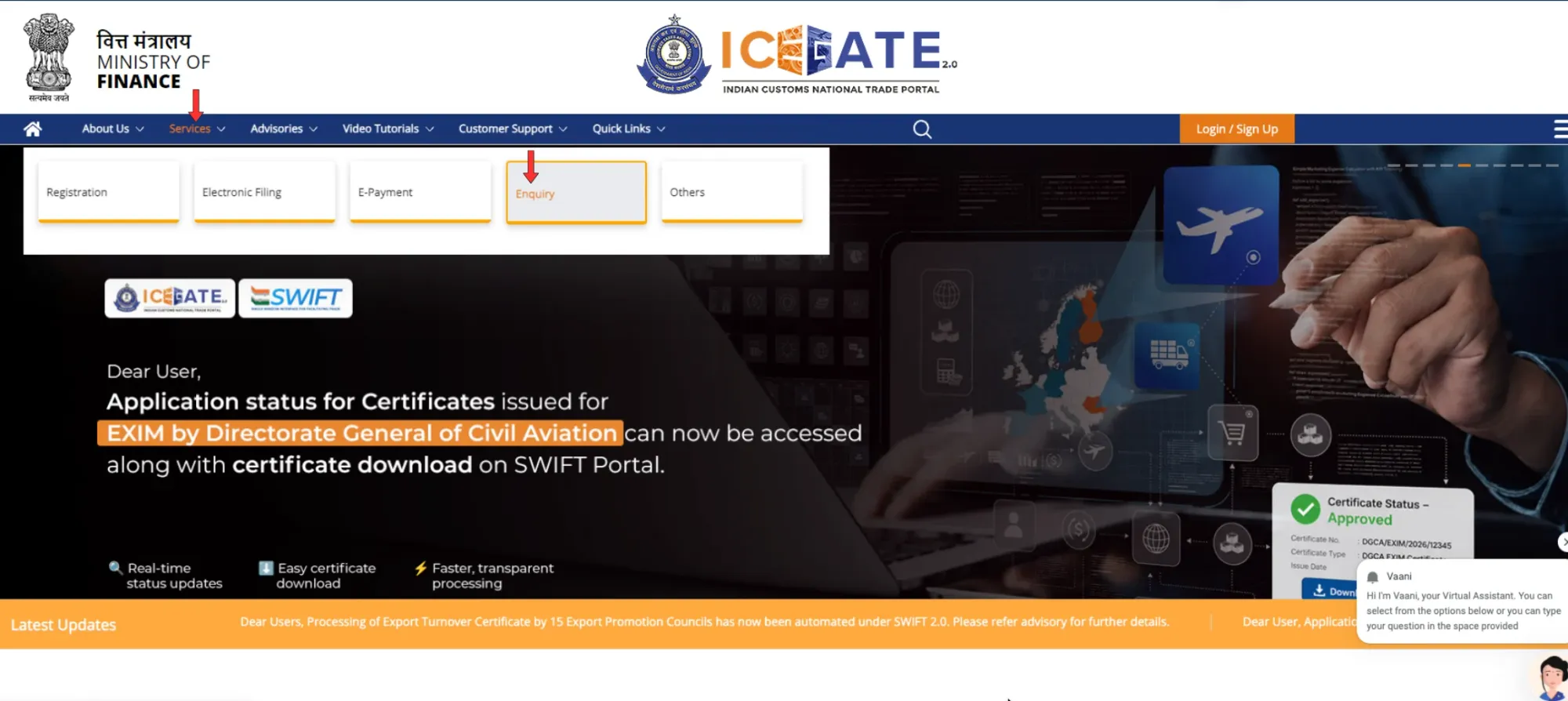
- Open icegate.gov.in and go to Services → Enquiry.
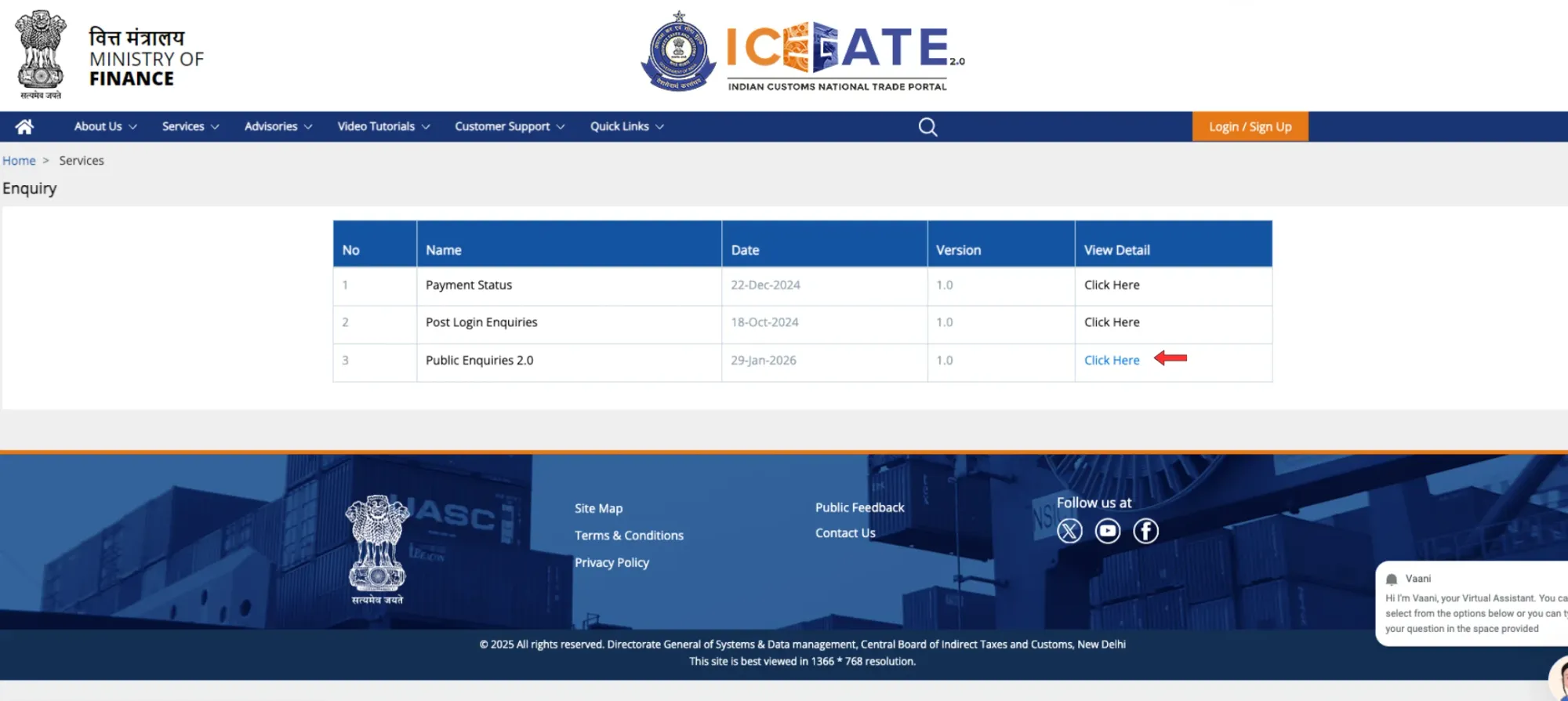
- Click Public Enquiries 2.0.
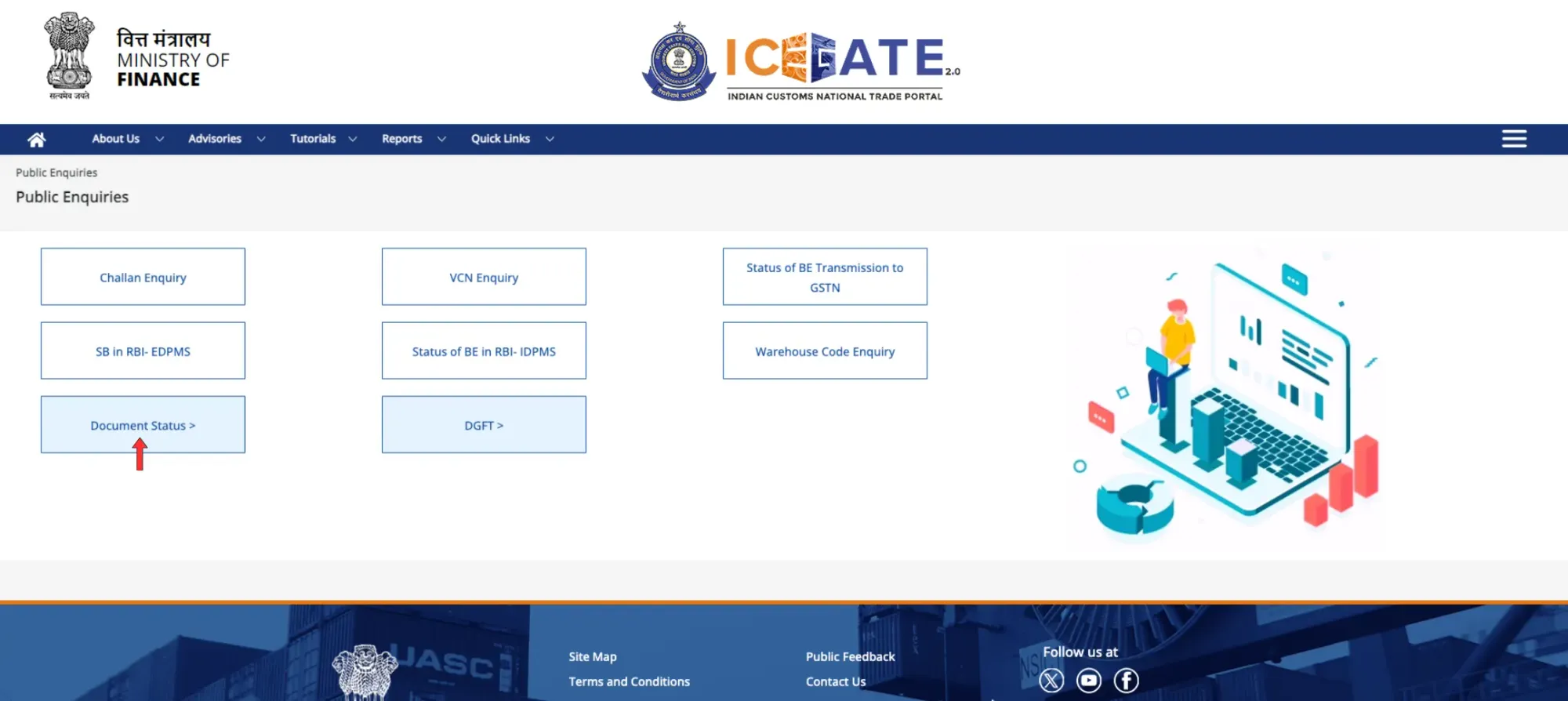
- Select Document Status,
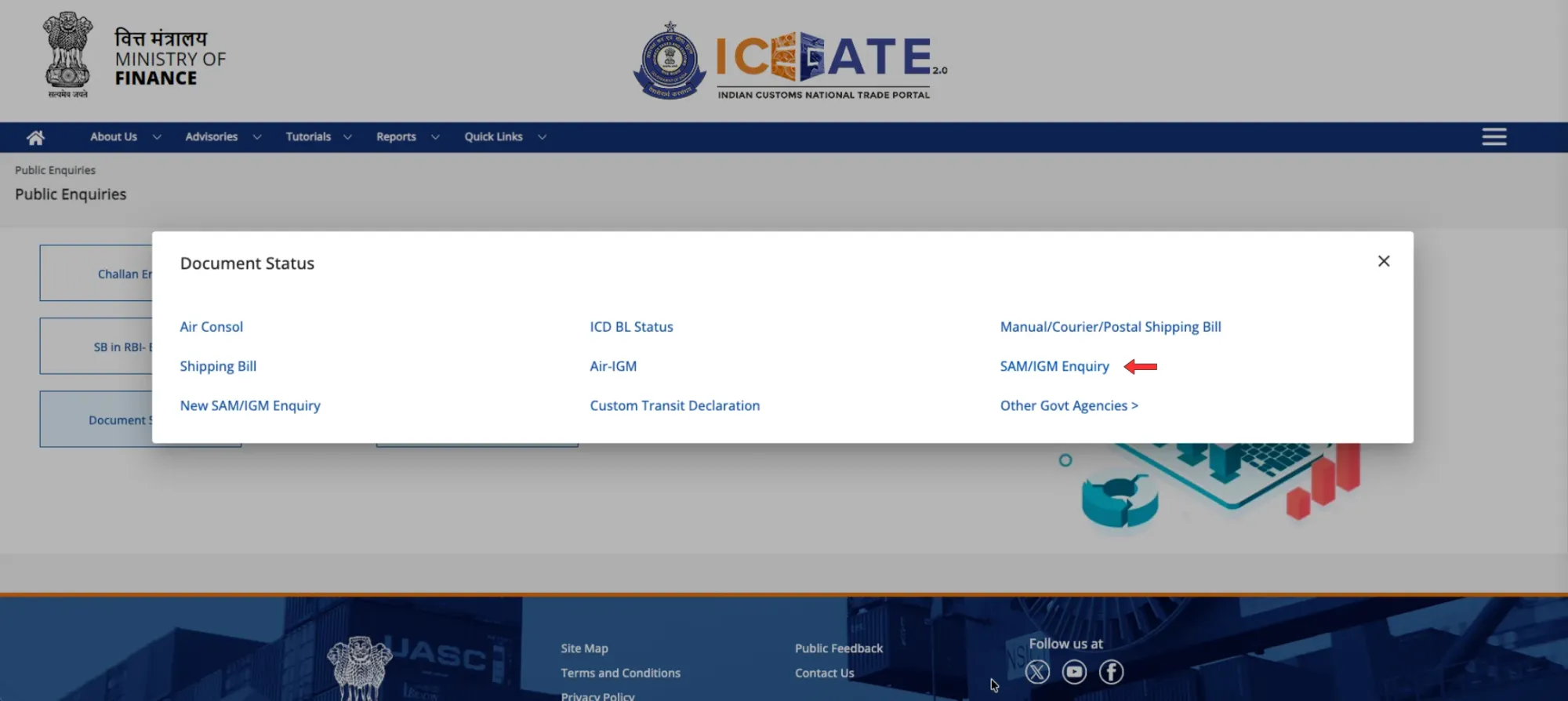
- Choose SAM/IGM Enquiry for Sea IGM and Air-IGM for Air IGM.
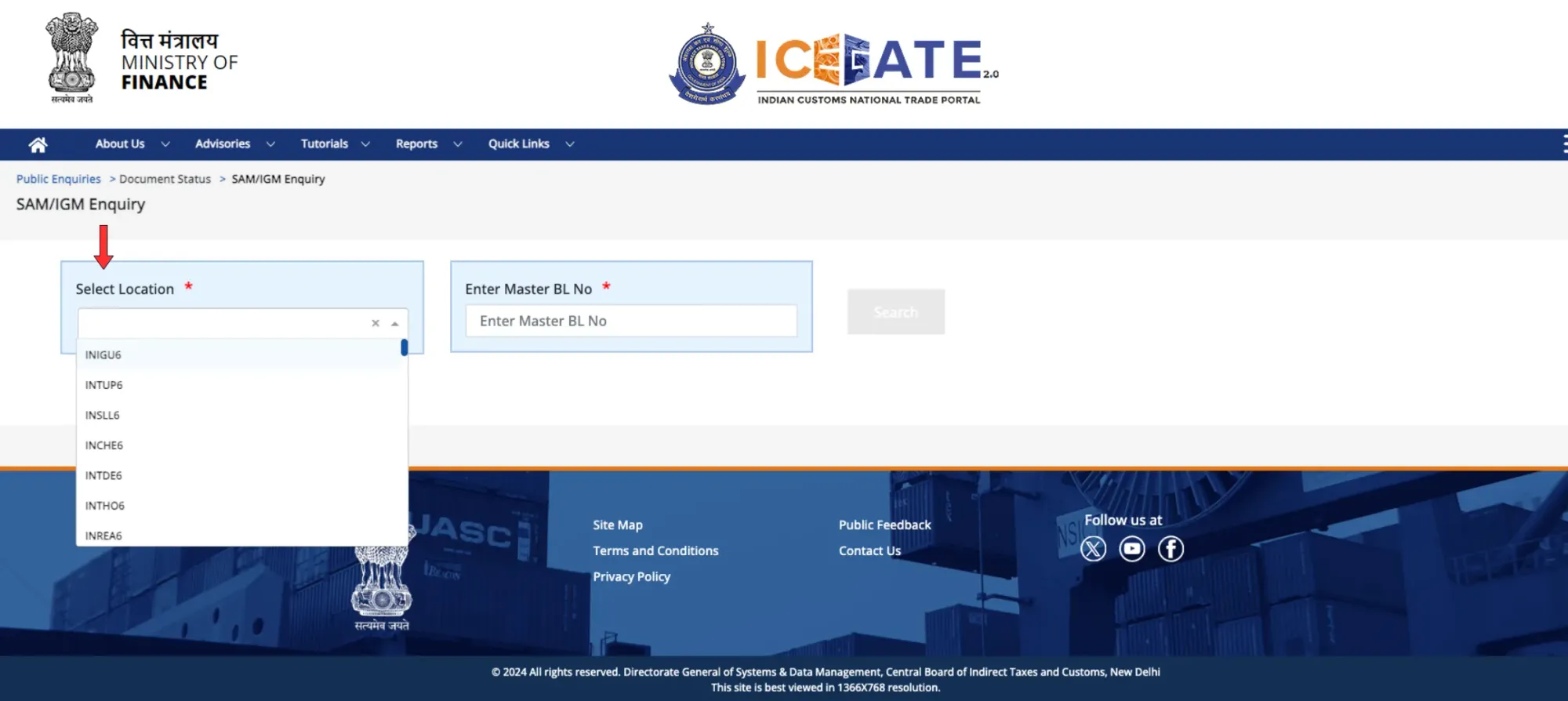
- Choose your discharge port from the list - for example INNSA1 (Nhava Sheva/JNPT), INMAA1 (Chennai), INMUN1 (Mundra), INCCU1 (Kolkata).
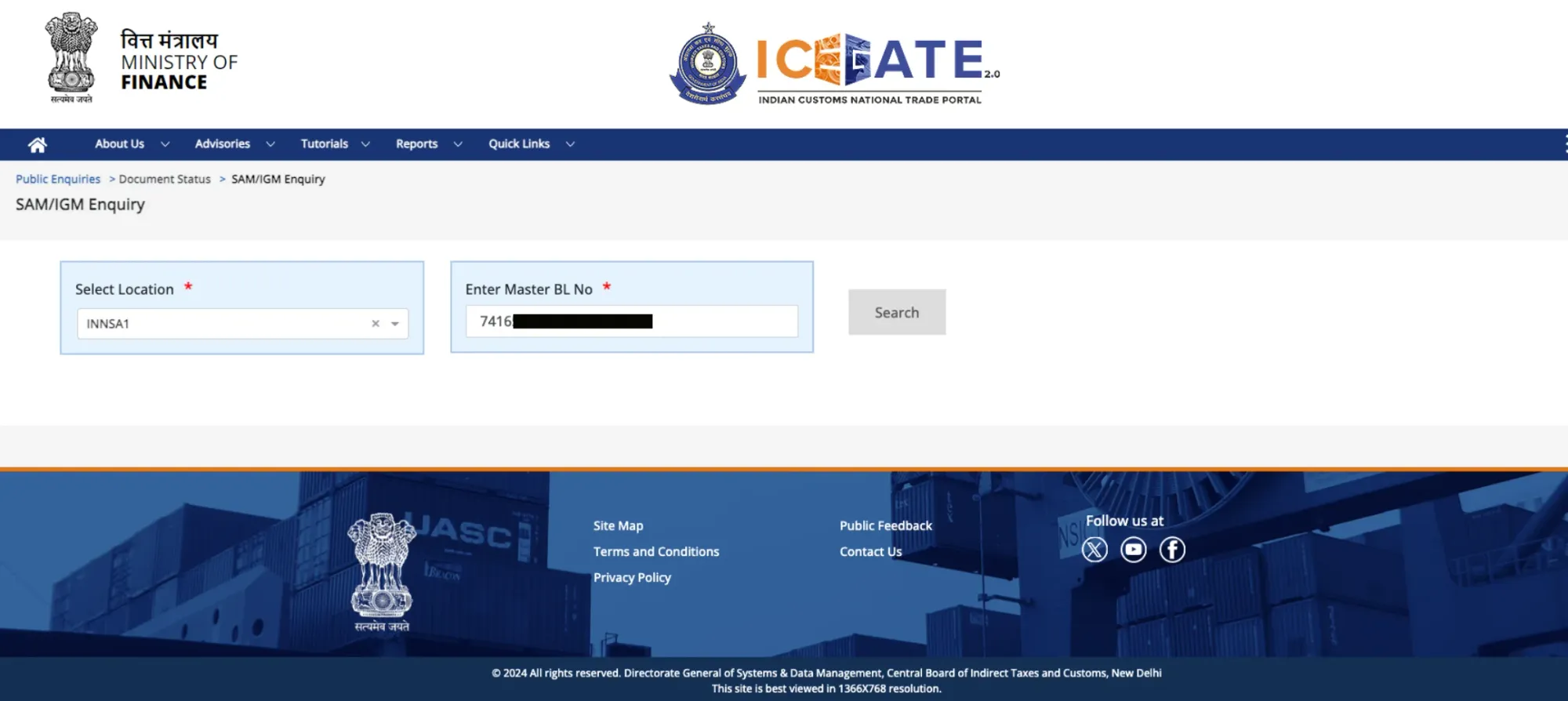
- Enter your Master Bill of Lading number.
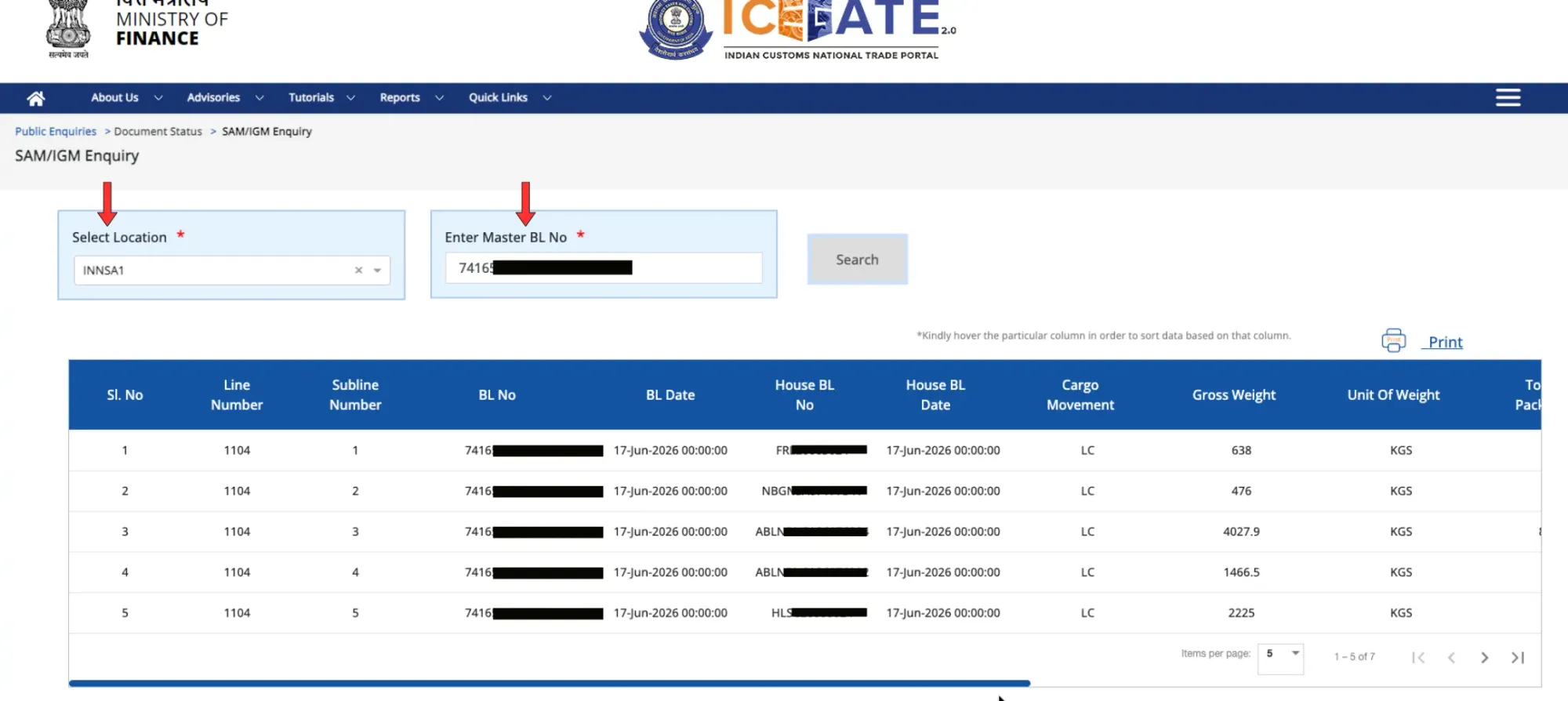
- Review the result: IGM filing status, vessel/voyage details, line/item number and cargo summary.
Guest access vs DSC login, which do you need?
Anyone can run the basic enquiry as a guest, with no login, and that covers status, vessel/voyage detail and your line item. You only need to log in with your registered ICEGATE credentials or a Digital Signature Certificate (DSC) when you need container-level data or specific Customs remarks. For day-to-day "where's my cargo" tracking, guest access is enough.
If you haven't set up ICEGATE access yet, our guide to ICEGATE registration covers what the portal is, who needs to register, and how to get your account and DSC set up before you need them.
Sea IGM status codes on ICEGATE - full reference table
Status labels appear as words or short codes depending on the port's ICES version. Here's every one, what it means, your next action, and the column most guides leave out, whether it blocks your Bill of Entry:
Status / Code | What it means | Your next action | Bill of Entry |
Filed | Carrier has submitted the IGM; awaiting Customs validation | Wait; re-check in a few hours | ⏳ Wait |
Pending | Filed, but Customs verification is still in process | Continue tracking | ⏳ Wait |
Validated | Structural validation passed; sent to the Customs (ICES) server | Almost ready - monitor for approval | ⏳ Wait |
Approved / Accepted (A) | Customs has accepted the manifest; IGM number is live | Proceed to file your Bill of Entry | ✅ Clear |
DIS | Cargo discharged at the port | Coordinate delivery / clearance steps | ✅ Clear |
ADC | Approved and discharge completed | Proceed with onward clearance | ✅ Clear |
SEC | Secured (informational) | No action needed | ✅ Clear |
Held (HLD) | Customs has placed a hold for verification | Contact your CHA to find and clear the reason | ⛔ Blocked |
Amended | The carrier has submitted corrections | Re-check that data now matches your B/L | ⏳ Wait |
Pending Correction / Mismatched (M) | A data mismatch exists between IGM and your documents | Get the carrier to file an amendment | ⛔ Blocked |
Not Found / Not Available (N) | IGM not filed yet, or not reflecting due to a glitch | Confirm filing with the line; retry later | ⛔ Blocked |
Rejected / Error (E) | Customs did not accept the filing | Carrier must re-file a corrected manifest | ⛔ Blocked |
Your IGM is stuck - the first 60 minutes
When a status comes back Held, Mismatched or Not Found, what you do in the next hour decides whether this costs you nothing or costs you a container's worth of demurrage. Run it in this order:
Minute 0-10 - Pin the exact field. Don't escalate "the IGM is wrong." Open the portal status and get your CHA to identify the specific conflicting field, weight, package count, BL number or container/seal number. You can't fix what you can't name.
Minute 10-25 - Reconcile against your physical B/L. Put the IGM line item next to your actual Bill of Lading and find the difference yourself. Often it's a single transposed digit (CN123456 vs CN123457) or a NULL seal field. Confirm whether the IGM is wrong or your documents are.
Minute 25-40 - Notify the line/agent in writing. Only the carrier can amend the manifest they filed. Send the correct value, the line item, and the supporting document in one clear written instruction, not a phone call you can't reference later.
Minute 40-60 - Open the demurrage clock conversation. Confirm your free-day count with the CDR/CFS and put the line on notice that the delay is amendment-driven. This is also when you run the estimator below, so you know your exposure before charges start.
Speed is your only leverage here, because you cannot amend the IGM yourself. The importers who avoid demurrage aren't the ones with better CHAs, they're the ones who started this clock on day one instead of day seven.
Top Sea IGM errors that delay cargo, and how to fix them
Error | Why it happens | How to fix it |
Container / seal number mismatch | A single wrong digit (CN123456 vs CN123457) or a NULL seal field | CHA flags the field; carrier files an IGM amendment with the correct number |
Bill of Lading discrepancy | BL number in the IGM doesn't match your physical B/L | Reconcile MBL/HBL with the line; amend the manifest to match |
Generic cargo description | Vague descriptions trigger risk/examination queries | Provide a precise, HS-aligned description for the amendment |
Incorrect HS code | Wrong classification affects duty & compliance checks | Correct the HS code on the BOE and align it with the IGM |
Late IGM filing | Carrier files after the SCMTR deadline | Escalate to the line; late filing can attract penalties under the Customs Act |
Notice the pattern in the fix column: the CHA flags, the carrier amends. Your role is detection and escalation, never the correction itself.
The IGM amendment process - step by step
When the data is wrong, here's the path back to a clean status:
- Identify the exact field causing the conflict - weight, package count, BL or container number using the portal status and your CHA.
- Notify the shipping line/agent immediately. Only the carrier can amend the manifest they filed.
- The carrier submits the amendment on ICEGATE. Customs may require supporting documents, and for some changes an amendment fee or approval.
- Re-track until the status reads Amended → Approved, then proceed with your Bill of Entry.
Your leverage throughout is speed plus escalation, because the one thing you cannot do is amend it yourself.
Why speed matters - a real cost example
Demurrage and container detention typically begin once your free days lapse. A 7–10 day documentation delay on a single FCL can easily exceed ₹1,00,000 in demurrage, detention and storage combined.
Here's the part that should change your behaviour: catching an IGM mismatch on day one, while the vessel is still sailing - instead of after the vessel berths is often the literal difference between zero charges and a five-figure bill. Same error, same correction, same carrier. The only variable is when you caught it.
Sea IGM vs Air IGM - what's the difference?
Parameter | Sea IGM | Air IGM |
Mode | Ocean / sea freight | Air freight |
Filed by | Shipping line / agent | Airline / consol agent |
Key reference | Master Bill of Lading (MBL) + port code | Air Waybill (AWB) + airport code |
ICEGATE path | Public Enquiries 2.0 → Document Status → SAM/Sea IGM | Public Enquiries 2.0 → Document Status → Air IGM |
Typical timeline | Days (transit + berthing) | Hours - much faster cycle |
After clearance - paying your supplier
Once your IGM is approved and the cargo clears, the trade isn't finished, you still have to pay your overseas supplier and, on the export side, receive your proceeds. This is where the cost most importers ignore shows up: FX margins and opaque bank charges.
EximPe handles cross-border payments for Indian importers and exporters at transparent, low-cost FX, with compliant documentation built in - so the money side of the shipment moves as cleanly as the cargo did. Explore EximPe →
FAQ: Answers to Common Sea IGM Questions
Frequently Asked Questions
Yes. Basic Sea IGM enquiry on Public Enquiries 2.0 is open to guests, you only need the port code and Master Bill of Lading number. Log in with a DSC only if you need container-level detail.
It varies by port and data quality. A clean manifest is often validated and approved within hours of filing; mismatches can push this to days, because the carrier must amend first.
It usually means the line hasn't filed yet, or there's a temporary portal glitch. Confirm filing with the shipping line, double-check the port code and BL number you entered, and retry. If it's genuinely unfiled, the carrier must file the IGM.
You can lodge a prior (advance) Bill of Entry before arrival, but it is only processed once a valid IGM exists and the data matches. A missing or mismatched IGM will block assessment.
The IGM number is assigned by Customs to the vessel's manifest; the BL number is issued by the carrier for your specific shipment. Customs matches both, and they must be consistent.
Yes. The ICEGATE Public Enquiries 2.0 portal works on mobile browsers, no app or login is required for the basic enquiry.