BRC in Export: Full Form, eBRC and How to Generate and Download It (2026)
BRC in export means Bank Realisation Certificate. How eBRC is now self-certified on DGFT, how to generate and download it, and the 2026 rules
Listen to article
Audio version (0% complete)
In export, BRC stands for Bank Realisation Certificate: the record that the payment for a specific export has been received in India against that shipping bill or invoice. Today it exists as the eBRC, the electronic Bank Realisation Certificate on DGFT's portal. Since Trade Notice 33/2023-24 dated 10 November 2023, the exporter generates it by self-certification from the Inward Remittance Messages (IRMs) the bank sends to DGFT. It is used to claim benefits under the Foreign Trade Policy and, for services, GST refunds.
The short answer
Who generates the eBRC: you, the exporter. Your bank transmits an IRM for each inward remittance to DGFT. You log in at dgft.gov.in, pick the IRM, attach your shipping bill or invoice details, and self-certify. The bank no longer issues it as a routine document.
Where to download it: DGFT portal, My Dashboard >> Repository >> select bill type e-BRC, search, click the eBRC number, then Print e-BRC.
What it costs: DGFT's own guide states that exporters do not have to pay eBRC charges to banks under the self-certified system.
The rule to remember: if the IRM is not in your DGFT IRM repository, you cannot generate the eBRC. Start every eBRC problem there, not at the bank branch.
What changed
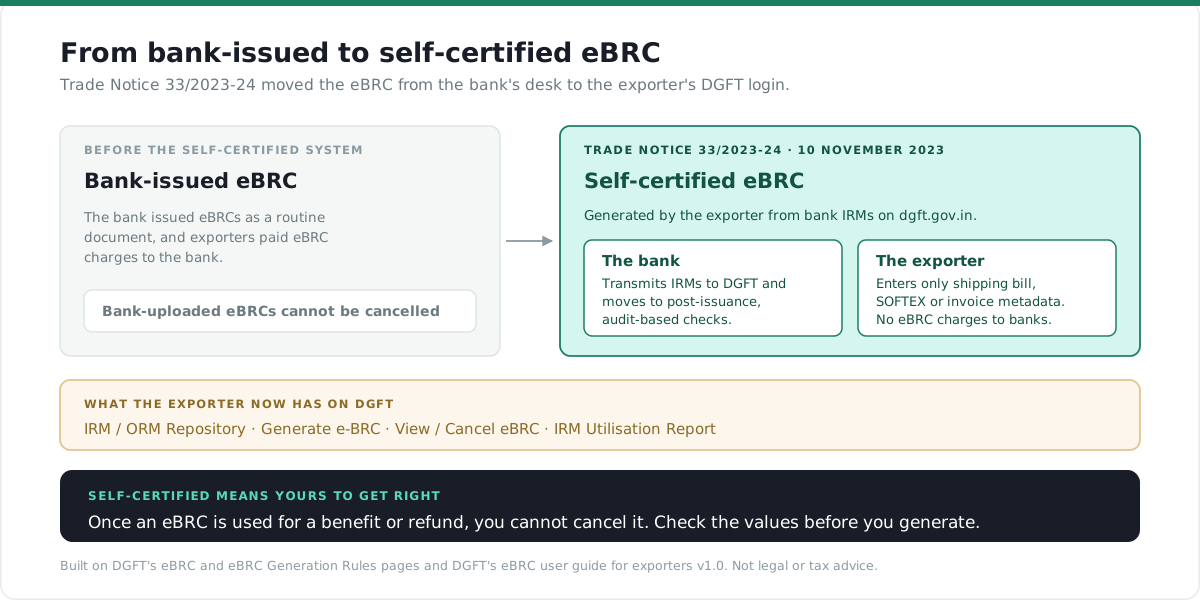
1. The eBRC became self-certified (from November 2023). Under Trade Notice 33/2023-24 dated 10 November 2023, DGFT moved eBRC to a system in which banks transmit IRMs directly to DGFT and exporters self-certify their eBRCs against them. DGFT's generation rules were last updated on 26 March 2024. DGFT's user guide for exporters lists what changed for the exporter: eBRCs are generated by providing only the metadata of the shipping bill, SOFTEX or invoice; no hard copies are needed; and no eBRC charges are paid to banks. Banks move to post-issuance, audit-based verification.
2. Services eBRCs need a new mandatory field (2025-26). DGFT has added a mandatory field, "Mode of Export of Services", to the eBRC format for the services export category, referring exporters to Trade Notice No. 02/2025-26.
3. New FEMA export regulations from 1 October 2026. The Foreign Exchange Management (Export and Import of Goods and Services) Regulations, 2026, Notification No. FEMA 23(R)/2026-RB dated January 13, 2026, come into force on 1 October 2026. As amended by Notification No. FEMA 23(R)/(1)/2026-RB dated September 22, 2026, Regulation 5 requires export value to be realised and repatriated within nine months from the date of shipment for goods and from the date of invoice for services, or twelve months where the export is invoiced or settled in Indian Rupees. The AD bank may extend the period on your request. More on what follows from this below.
How eBRC generation works
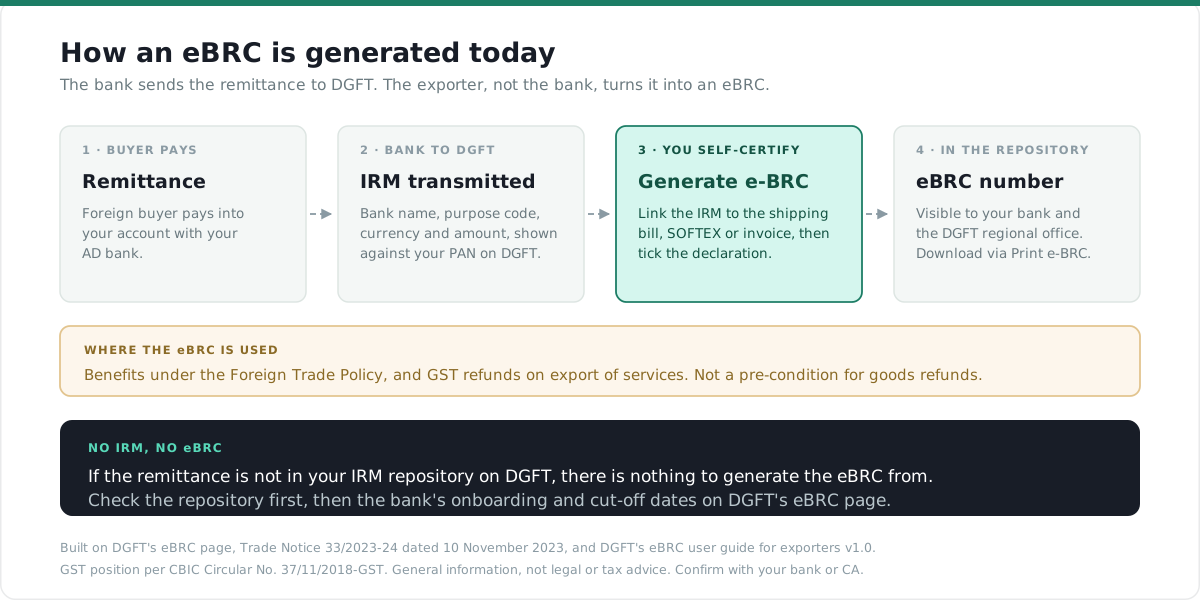
Your buyer pays. Your AD bank credits the account and transmits an IRM to DGFT against your PAN, carrying the bank, purpose code, currency and amount. That IRM appears in your IRM / ORM Repository on DGFT. You then generate the eBRC by linking that IRM to the export it pays for. Once generated, the eBRC is visible to your bank and to the DGFT regional office in the repository.
For the monitoring system that sits behind this on the bank's side, see EDPMS and IDPMS.
How to generate an eBRC on DGFT, step by step
Before you start
DGFT's form has three stages: Attach IRM(s), Shipping Bill / Invoice Details and Declaration. Check the IRM before you open the form.
Before you start
You need a DGFT website login with your IEC linked to it. If you do not have an IEC yet, see how to apply for an IEC online.
Update your DGFT profile before you begin. The declaration page pulls your name, designation, email, mobile and address from the logged-in profile. Correct it under Username >> Profile now, not at the last screen.
Keep the shipping bill or invoice to hand, along with your AD code. For what the AD code is and where it comes from, see what an AD code is.
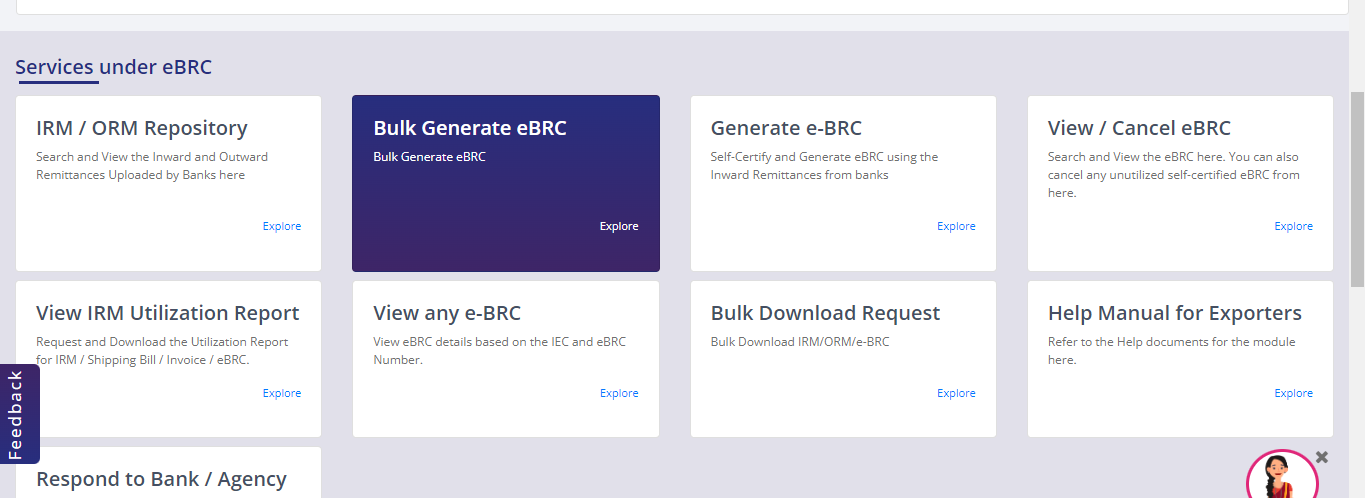
Everything below starts from the same place: log in, then Services >> eBRC.
Step 1: Confirm the IRM has reached DGFT
- Click IRM / ORM Repository.
- Select Inward Remittance. Your IEC fills itself.
- Search by IRM number, bank name, remittance date range or IRM status. For a long date range, use IRM/ORM Bulk Download rather than the on-screen search.
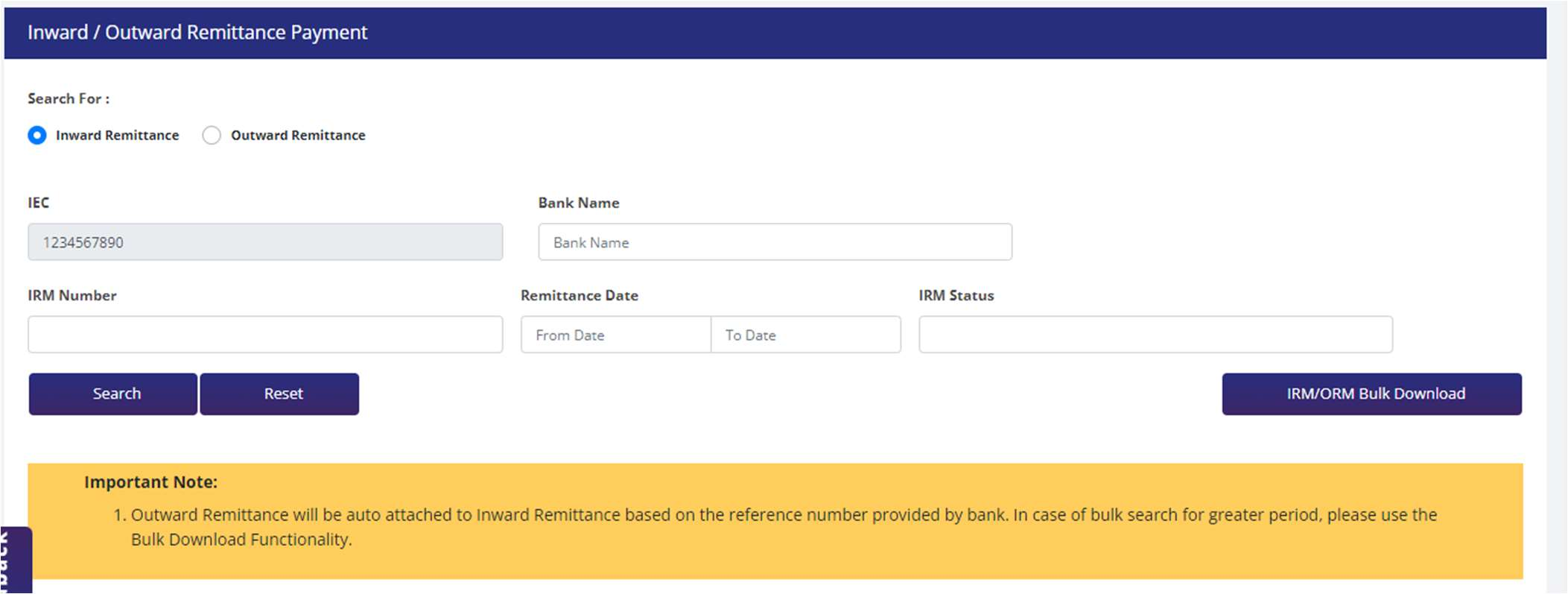
If the remittance is not listed, stop here. No later step works until the bank transmits it.
Step 2: Attach the IRMs
- Click Generate e-BRC. You land on a list of drafts. Start Fresh Application opens a new form; Proceed With Existing Application reopens a saved one, so you do not have to finish in one sitting.
- Choose the type of eBRC: Goods, Deemed Export or Services, and for services, IT or Non-IT.
- Enter the IRM Number and the Amount for eBRC (E). Those are the only two fields you type. The bank name, purpose code, IRM currency, Remittance Amount (A), amount Attached to Other eBRCs (B) and ORM Attached (C) fill in from the bank's message.
- DGFT then shows IRM Amount Available to Generate Fresh eBRC (D = A - B - C), and the balance left on the IRM after this eBRC, F = D - E.
- Click Add IRM to club further remittances. The table totals the eBRC value and shows the eBRC currency. Click Save & Next.
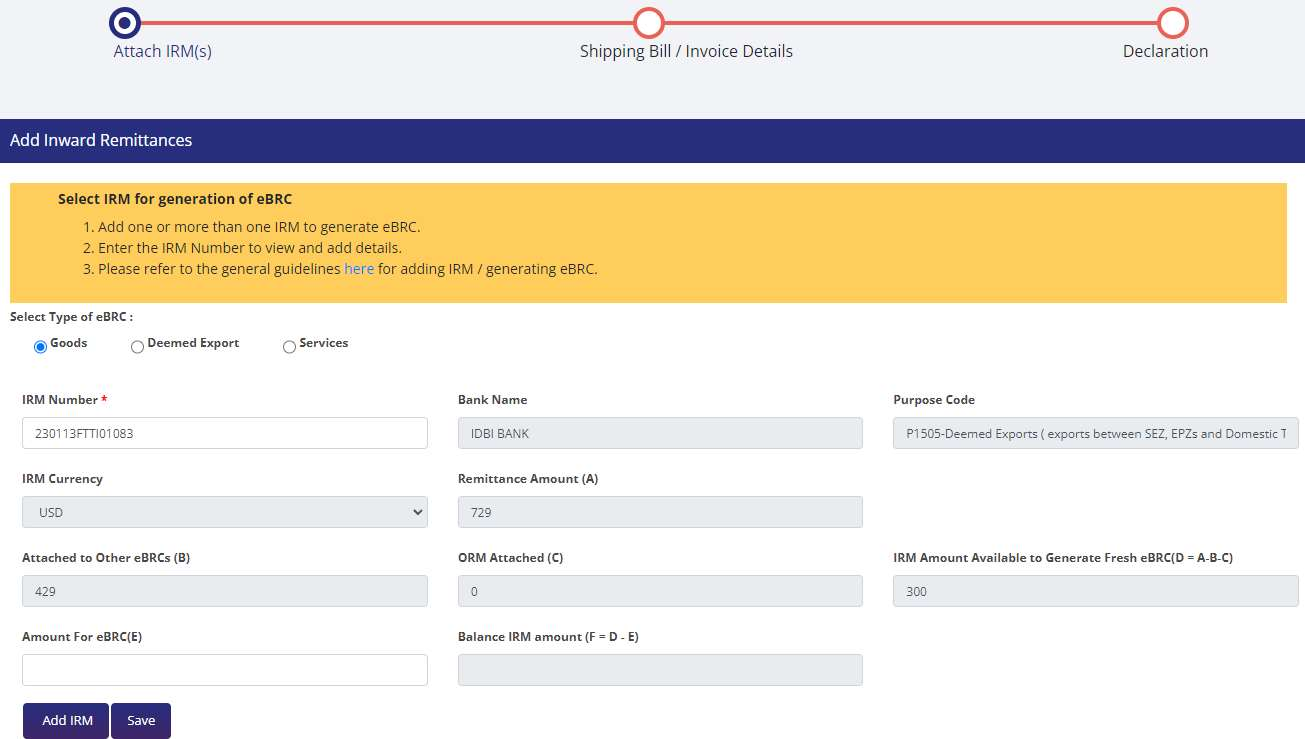
Read D before you type E. If D is lower than the remittance, something has already drawn on that IRM: an earlier eBRC (B), or an ORM the bank attached (C). That is almost always why the portal refuses the full amount.
Step 3: Enter the shipping bill or invoice details
For goods, you enter the AD code, shipping bill number and date, port code, shipping bill currency and value, and invoice number. DGFT fills in your IEC, exporter name, IFSC, account number, the realisation date (the latest date among the clubbed IRMs) and the FOB value realised (the total of the clubbed IRM amounts).
For services, you enter the AD code, invoice number and date, port code, invoice currency and value, and the SAC code, and the screen also asks for the country. Since Trade Notice No. 02/2025-26, services eBRCs also carry the Mode of Export of Services. SOFTEX exports and other services use different SAC codes; DGFT's Purpose Code to SAC Mapping, linked from the eBRC page, lists which applies.
Then enter any commission, discount, insurance, other deductions and freight. DGFT calculates the Net Realised Value as FOB value realised, minus commission, discount, insurance, other deductions and freight.
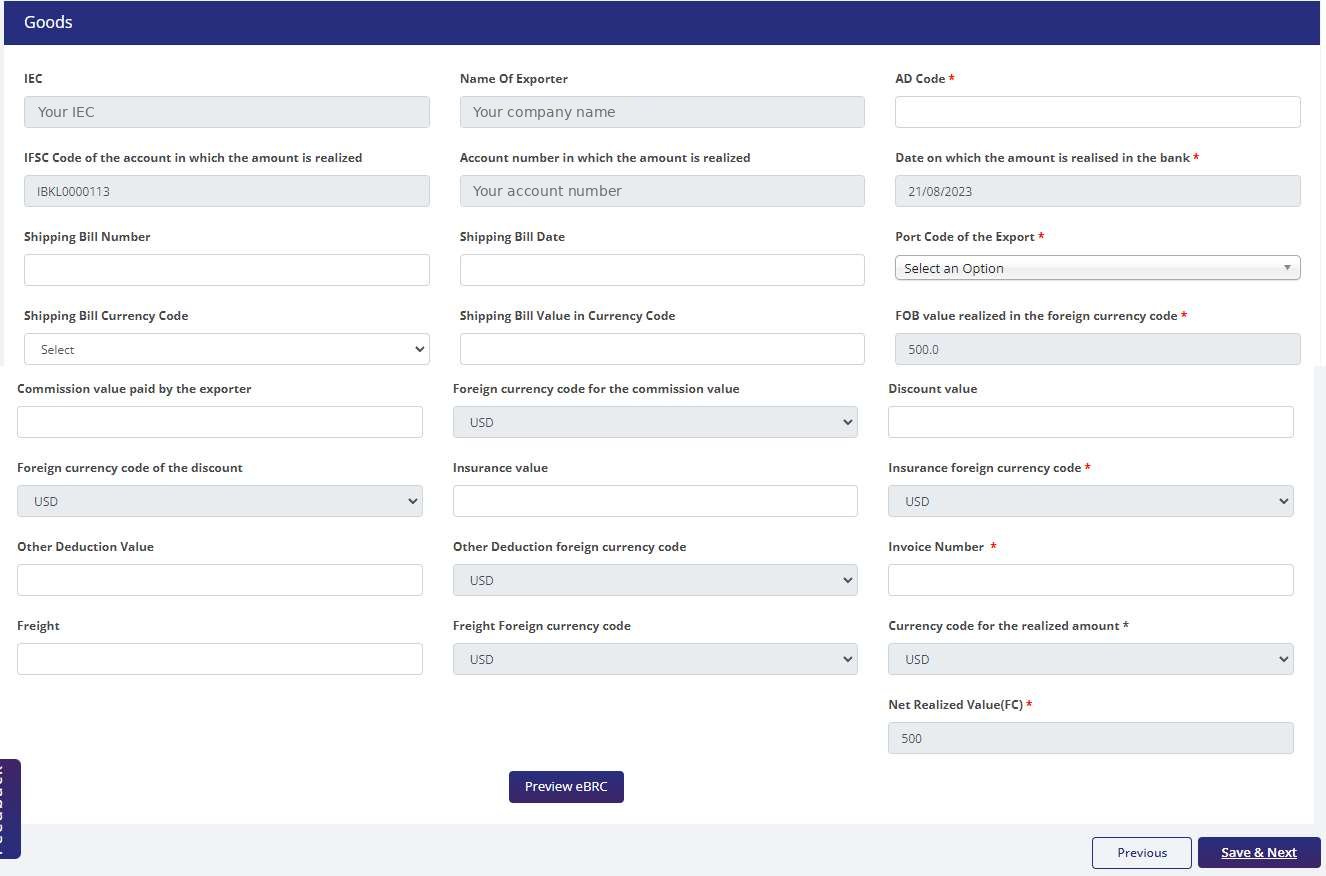
Click Preview eBRC and check the Net Realised Value against your shipping bill before you save. Then Save & Next.
Step 4: Sign the declaration and generate
- Read the declaration and tick the acceptance box.
- Enter the Place. The date fills itself. Check the user details pulled from your profile.
- Click Generate e-BRC.
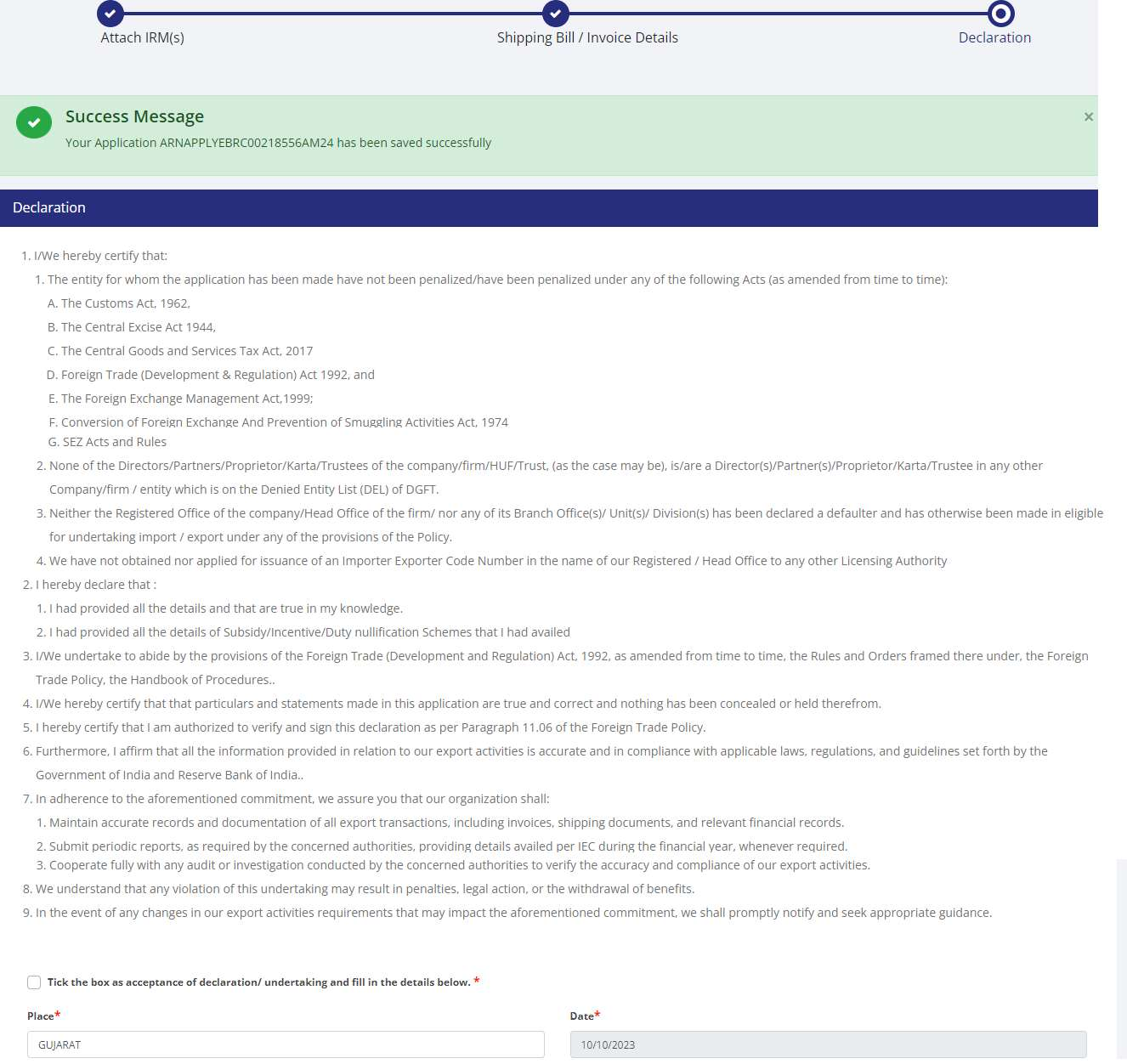
A pop-up shows the eBRC number. The eBRC then sits in the repository with Loaded status, visible to your bank and the DGFT regional authority.
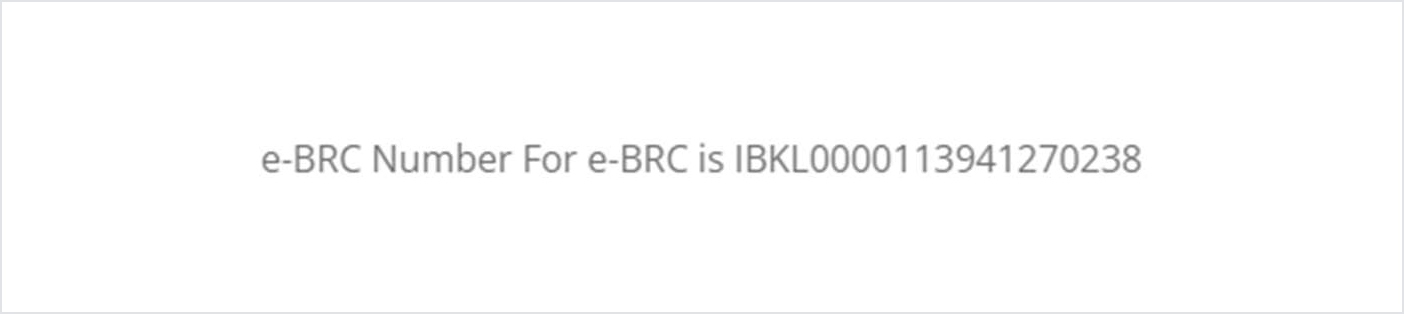
What the declaration commits you to. It asks you to state the entity's penalty record under the Customs Act, the CGST Act, FEMA, the Foreign Trade (Development and Regulation) Act and others, confirms that none of your directors or partners holds that role in another firm on DGFT's Denied Entity List, and commits you to keep export records and cooperate with any audit. Self-certification moved the bank's check to after issuance. This declaration is what that check is measured against.
The rules DGFT applies when you club remittances
Rule | What DGFT allows |
Purpose codes P0101 and P0108 | No eBRC can be generated for these codes |
P0103, advance receipt against an export contract | Can be used alone, or clubbed with any other purpose code |
Any two other purpose codes | Cannot be clubbed into a single eBRC |
Clubbing IRMs | Only IRMs of the same currency, and of the same bank |
Services, IT | Only P0802, P0803, P0807 and P0103 apply |
One shipping bill, several banks | One shipping bill can be used for two or more eBRCs of different banks |
For services, you can only attach invoices whose SAC codes match the description of those services. For P0103, the shipping bill or invoice date must be on or after the remittance date. For what each purpose code means, see the RBI purpose code list.
How to generate eBRCs in bulk
Bulk Generate eBRC replaces one form per eBRC with one Excel file per batch.
Prepare and upload the file
- Go to Services >> eBRC >> Bulk Generate eBRC, then click the Bulk Generate eBRC button.
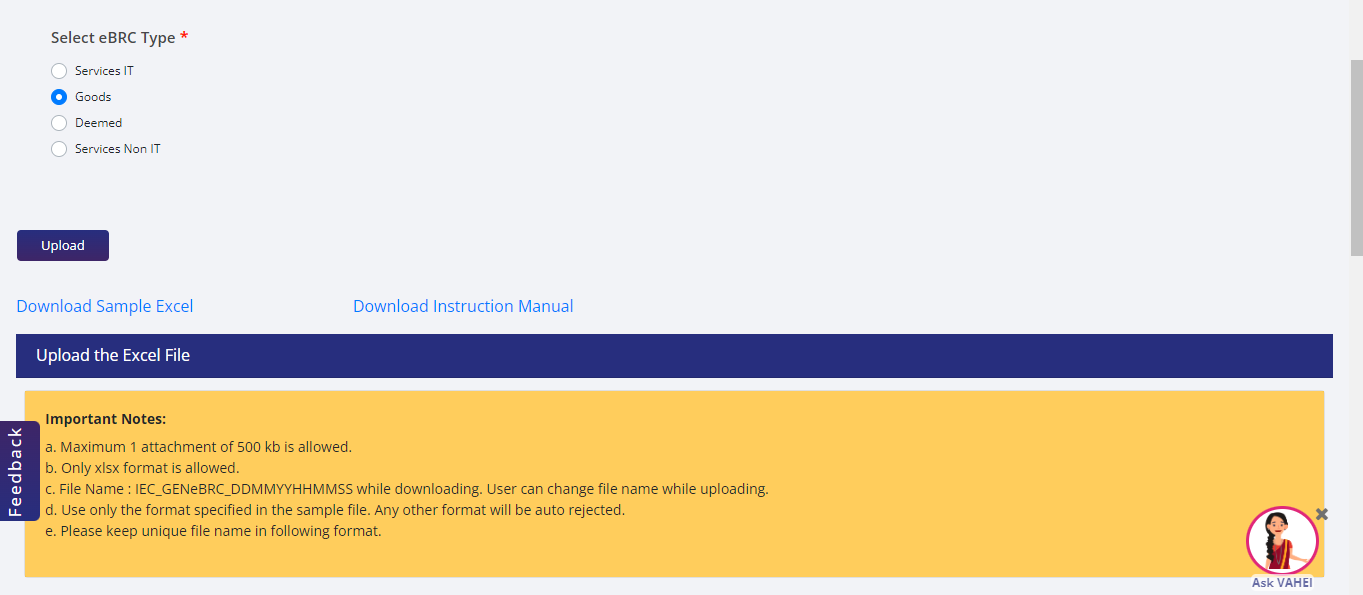
- Select the type: Services IT, Goods, Deemed or Services Non IT. Download the sample Excel and the instruction manual from the same screen.
- Fill the template. Each row maps one IRM to one shipping bill, SOFTEX or invoice: your IEC branch serial number, IFSC and AD code; the IRM number, date, currency, purpose code and available amount exactly as the bank sent them to DGFT; the document number, date and port code; the bill number; and how much of the IRM you are mapping to that document. Serial numbers run from 1 to 999 in a file.
- Upload. One file, up to 500 KB, in .xlsx, in the sample's format and with a unique file name. The template downloads as
IEC_GENeBRC_DDMMYYHHMMSS, which you may rename.
Submit and track it
- If the file passes, review the records, then Save, Sign and Submit.
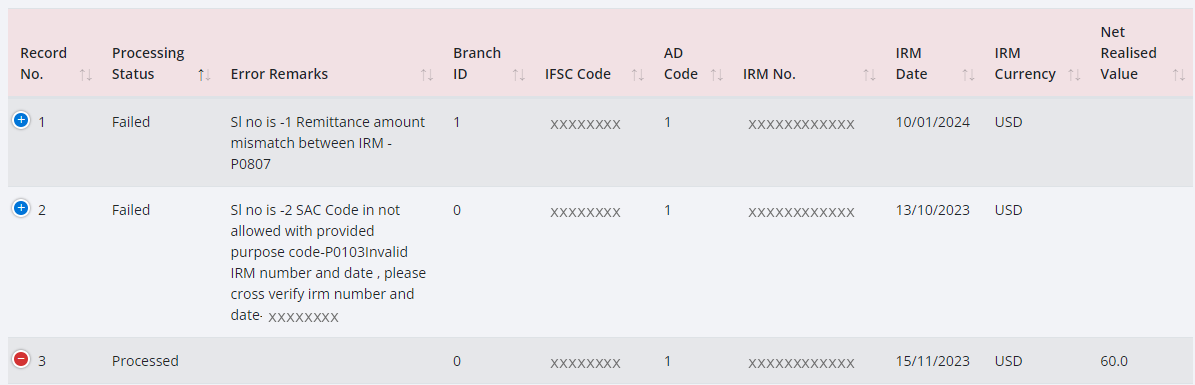
- Track it on the same screen. The status moves through Success - Pending Signature, Processed or Failed. Click Processed or Failed to see each row's eBRC number, date and Net Realised Value, or its error remark. Allow 30 to 180 minutes.
The rules in a bulk file depend on the eBRC type:
| eBRC type | Clubbing IRMs in one eBRC | Purpose codes accepted | What DGFT matches on |
|---|---|---|---|
| Goods | Allowed | P0102, P0103, P0104 and P0109 only | Shipping bill number and date, invoice number, port code |
| Deemed export | Allowed | P1505 and P0103 | Invoice number and date, port code |
| Services, IT | Not allowed: one IRM, one eBRC | P0103, P0802, P0803 and P0807 | Invoice number, IRM date, SOFTEX number and date, IRM number, port code |
| Services, non-IT | Not allowed: one IRM, one eBRC | P0102, P0104 and P0109 not accepted | Invoice number and date, IRM date, IRM number, port code |
Across every type, clubbed IRMs must share currency and bank, and for goods and deemed exports they must sit under the same active IEC branch. P0101 and P0108 are blocked here too.
Three things in the file catch people:
- A clean upload is not a clean file. DGFT's own note on the screen says the upload checks only the basic format; business validation runs after you submit. Rows can still come back failed hours later.
- Every deduction has two columns. Commission, discount, insurance, other deductions and freight each have a "to be deducted" column, which reduces the Net Realised Value, and a "for info" column, which does not. Put freight in the wrong one and every eBRC in that file carries the wrong value.
- The file asks two questions the single form does not. Whether the payment came into a Vostro account, and if so whether it is a Special Vostro (SVRA) realisation or not (NVRA); and whether it is a third-party export with the remittance received through a third party.
How to download, view or cancel an eBRC
Download: My Dashboard >> Repositories >> Bills Repositories, then under Select Bill choose Bank Realisations (e-BRC). Search by eBRC number, BRC issue dates, shipping bill number, date or port, Bill ID, authorisation number or Utilisation Status. Click the eBRC number, then Print e-BRC. Request for Bulk Download on the same screen exports many at once.
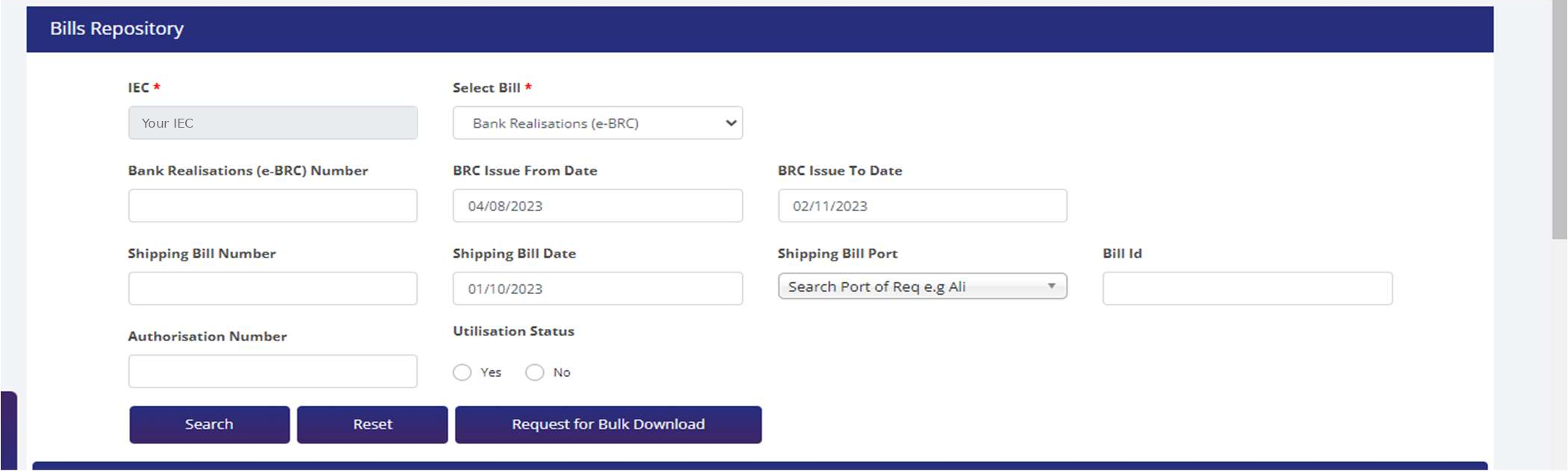
Filter on Utilisation Status "No" before you file a refund or incentive claim. It shows which eBRCs are still unused, and an unused eBRC is the only kind you can still cancel or correct.
Look up an eBRC by number: View any e-BRC on DGFT's eBRC page shows details from an IEC and eBRC number. The same page offers API Management for Exporters.
Cancel: run the same search, click Initiate in the Cancel eBRC column and confirm. DGFT shows the IRM and eBRC details read-only. Enter a remark, which is mandatory and limited to 250 characters, tick the declaration and sign with DSC or e-Sign. Two limits apply. An eBRC uploaded by a bank cannot be cancelled by you. And a self-certified eBRC that has already been used to claim any benefit, incentive, IGST or other refund cannot be cancelled.
Check your remittances against your exports: Services → eBRC → View IRM Utilization Report. Enter the IRM date range (mandatory), narrow it by IRM, eBRC, shipping bill dates or bank if needed, and click Submit Request. A Processed request downloads as Excel and is also emailed. A Failed one shows why; "too many records" means shorten the date range.
BRC vs eBRC vs FIRC
Document | What it records | Who produces it | Linked to a specific export? |
BRC | Realisation of payment against an export | Issued by the bank on paper | Yes |
eBRC | The same, electronically, on the DGFT portal | Self-certified by the exporter from bank IRMs since Trade Notice 33/2023-24; earlier uploaded by banks | Yes, to a shipping bill, SOFTEX or invoice |
FIRC | A foreign inward remittance received by the bank | Issued by the bank | Not necessarily |
The difference that matters in practice: an eBRC ties the money to a particular shipping bill or invoice, which is why DGFT asks you for those details before it generates one. How the paper certificates gave way to the electronic ones is covered in EDPMS and IDPMS.
Where the eBRC is actually required
GST refunds on export of services. Under rule 89(2) of the CGST Rules, a refund claim on export of services carries a statement of the invoices and the relevant BRCs or FIRCs. CBIC's Circular No. 37/11/2018-GST dated 15th March, 2018 lists BRC/FIRC among the documents for refunds on export of services, both with payment of IGST and under LUT.
GST refunds on export of goods: not a pre-condition. The same circular, at paragraph 12, clarifies that realisation of consideration is not a pre-condition for export of goods, and that proof of realisation of export proceeds for refunds on export of goods "should not be insisted upon". For goods, the refund claim carries the shipping bill and invoice details instead. If you export under a Letter of Undertaking, see what an LUT is.
Foreign Trade Policy benefits. DGFT describes the eBRC as the document that establishes inward remittances for availing benefits under the Foreign Trade Policy, as well as tax exemptions and refunds under GST.
Problems that actually come up
- The IRM is not in your repository. Your bank transmits IRMs to DGFT. DGFT publishes each bank's onboarding status and cut-off dates under Banks Onboarding / Cut-Off Dates on the eBRC page. Check that list, then raise it with the bank.
- Less is available on the IRM than you received. D = A - B - C. An earlier eBRC or an ORM the bank attached has used part of it. The IRM Utilisation Report shows where it went.
- The purpose code blocks generation. A remittance coded P0101 or P0108 cannot produce an eBRC. The purpose code arrives on the bank's IRM, so a wrong code is a question for your bank.
- An advance payment before the shipping bill. For P0103, DGFT requires the shipping bill or invoice date to be on or after the remittance date. No eBRC is generated before that date, even for an advance.
- Two remittances that will not club. Different currencies, different banks or accounts, or two purpose codes other than P0103 cannot go into one eBRC.
- Services invoice not selectable. Only invoices whose SAC codes match the service can be attached.
- A bulk file that fails. At upload, the cause is format: over 500 KB, the wrong file type, a reused file name, or a value over its length limit. After submission, each failed row carries a remark, such as a remittance amount that does not match the IRM or a SAC code not allowed with the purpose code. Correct rows against your IRM repository, not your own books.
- An eBRC or IRM flagged by the bank. DGFT's eBRC page has a Respond to Bank / Agency option for answering flags online.
- A wrong deduction on an eBRC. DGFT lets you update discount, freight, commission, insurance and other deduction values on an existing eBRC only if it has not been used for any benefit.
The realisation deadline that matters from 1 October 2026
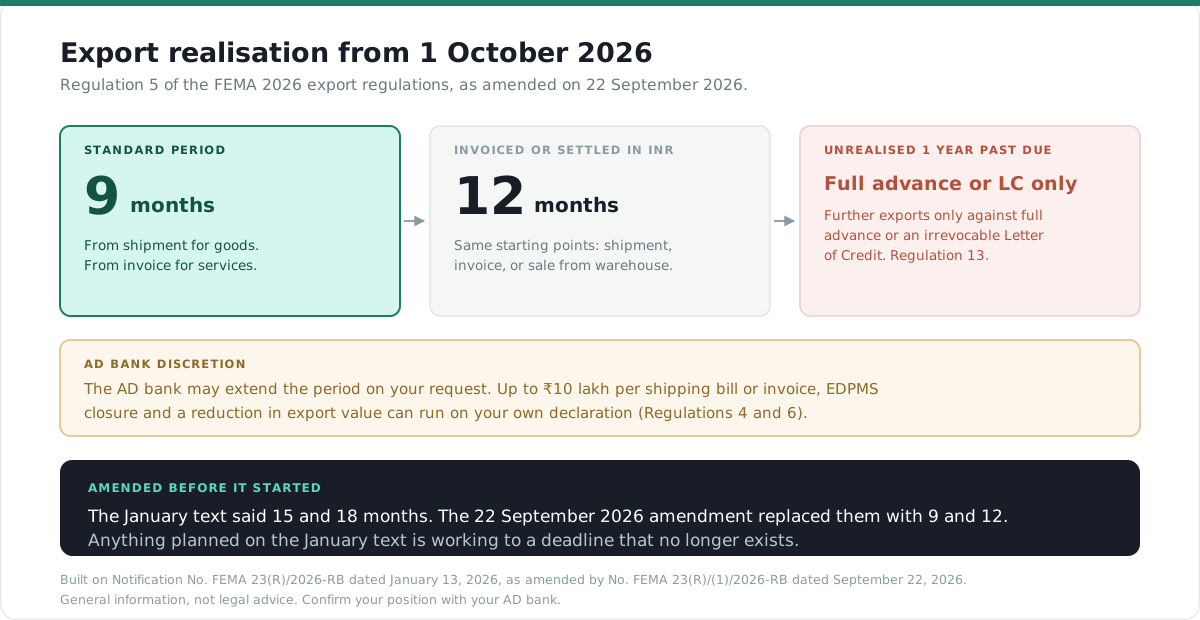
From 1 October 2026, Regulation 5 of the 2026 regulations sets nine months from shipment for goods and from invoice for services, and twelve months where the export is invoiced or settled in Indian Rupees. Your AD bank can extend it on request. Where the shipping bill or invoice is up to ₹10 lakh, the EDPMS entry can be closed on your declaration that payment has been realised (Regulation 4), and a reduction in export value up to ₹10 lakh can be allowed on your declaration (Regulation 6). If you export services, the declaration side changed too: you now file an EDF with your AD bank within 30 days from the end of the invoice month. See EDF form and IDPMS for services.
If proceeds stay unrealised for more than one year beyond the due date, or any extended period, Regulation 13 allows further exports only against full advance or an irrevocable Letter of Credit. Exporters already on the RBI Caution List as on 30 September 2026 remain governed by that order until they are removed from it.
Frequently asked questions
Frequently Asked Questions
Bank Realisation Certificate. It records that the payment for a particular export has been realised. Its current form is the eBRC on the DGFT portal.
Electronic Bank Realisation Certificate.
Log in to dgft.gov.in with your IEC linked, go to Services >> eBRC >> Generate e-BRC, enter the IRM number your bank has transmitted, add the shipping bill or invoice details, and self-certify.
My Dashboard >> Repositories >> Bills Repositories >> select Bank Realisations (e-BRC) >> search >> click the eBRC number >> Print e-BRC.
DGFT deducts the amount already used on other eBRCs and any outward remittance the bank attached to that IRM. The available figure is D = A - B - C on the Attach IRM screen.
Under the self-certified system from Trade Notice 33/2023-24, the bank transmits the IRM and the exporter generates the eBRC. DGFT's guide still refers to eBRCs uploaded by banks, which the exporter cannot cancel.
No. CBIC Circular No. 37/11/2018-GST clarifies that proof of realisation should not be insisted upon for refunds on export of goods. It is required, as BRC or FIRC, for refunds on export of services.
DGFT's guide states that exporters do not have to pay eBRC charges to banks under the self-certified system.
A FIRC records a foreign inward remittance received by the bank. A BRC, now the eBRC, ties realisation to a specific shipping bill or invoice.
Nine months from shipment for goods or from invoice for services, and twelve months where invoiced or settled in INR, under Regulation 5 of the FEMA 2026 regulations as amended on 22 September 2026.